Running the Test Executive |
  
|
Running the Test Executive |
|
To run the Test Executive:
STEPS
1. |
Right-click on the desired decision model in the Explorer pane and select 'Test Executive'. |
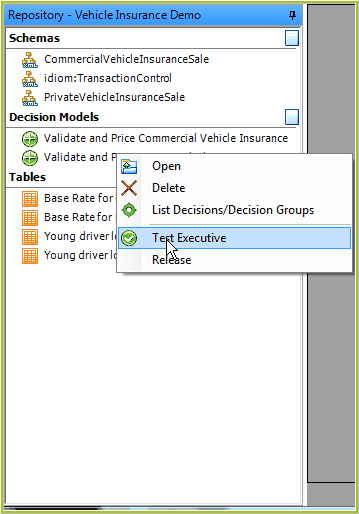
Figure 7-5: Opening the Test Executive pane from the Explorer pane
IDIOM opens the Test Executive pane in the workspace.
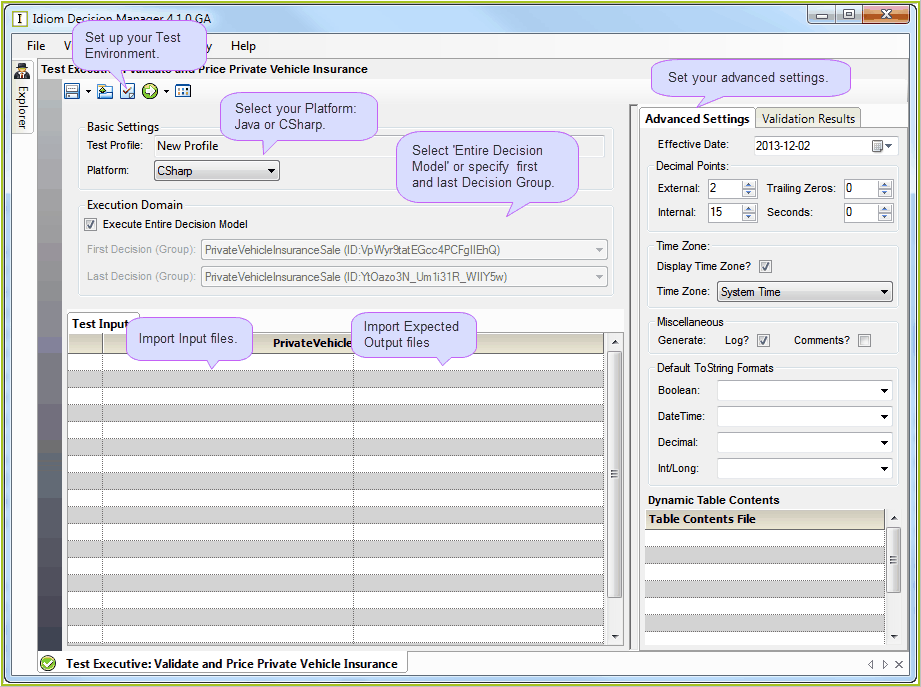
Figure 7-6: The Test Executive pane
Now you can configure your Basic Settings:
2. |
The first time you use the Test Executive, you will need to set up the test environment (see Setting Up the Test Environment). Thereafter, IDIOM will remember the configuration. |
3. |
Select the platform you are working on (e.g. Java or C#. We are using C#). |
4. |
Choose the first and last 'root' decision groups you wish to include in your test. By default, these are the first and last root decision group in the nominated decision model. |
5. |
Set your advanced settings. (See In-line Test Settings for more information.) NOTE: The settings in the Test Executive are independent of any test In-Line Test settings loaded in to the decision model properties and used by the debugger. These settings need to be specifically set for the test executive prior to running. |
Finally, to run the test:
6. |
Select one or more test input files (see Importing Test Input Files). These are previously prepared XML files that contain test input data that is used for generating outputs during testing. |
7. |
Optionally, select one or more 'expected output' files (see Importing Expected Output Files). These are previously prepared XML files that contain the expected output data generated during testing of the associated input files. |
NOTE: When multiple schemas or large numbers of input documents are to be tested at once, multiple input and expected output files can be saved and imported as a folder, rather than as individual files. (see Importing Multiple Files)
8. |
Click on the 'Execute' button |
IDIOM then displays the results from the testing (see Reviewing Test Results ).
 to run the first test and produce new output files. (see