Use Previous Context (UPC) |
  
|
Use Previous Context (UPC) |
|
The Use Previous Context right-click menu option associates the context of a decision (group) with the context of its ancestor's decision group. The Use Previous Context feature binds the iteration through one collection to the iterations of its ancestor's collection.
An example is the Claim Example 6 decision group in the Iteration Examples model of the Vehicle Insurance Demo repository. In the original example the Decision Manager will iterate through the two Claim collections independently resulting in many-to-many iterations. In the amended example the Use Previous Context links the two iterations resulting in many-to-one iterations:
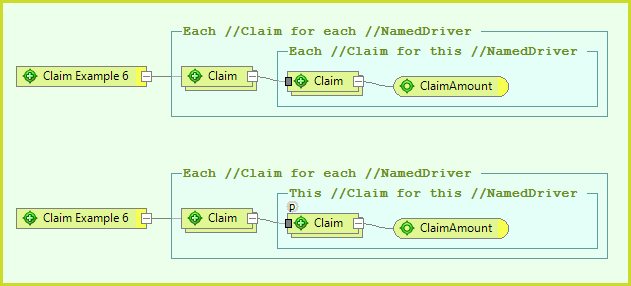
Figure 3-18a Named Driver Claims with and without Use Previous Context.
The Decision Manager has extended support for the Use Previous Context functionality.
1.The decision (group)s that have an ancestor can be identified by the gray square on the left hand side.
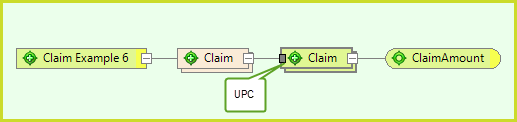
Figure 3-18c Use Previous Context icon
2.The Use Previous Context flag will be automatically selected when applicable. This is identified by the small p above the left hand side.
The Use Previous Context flag can be toggled with its right-click menu option. The automatic selection of this flag can be turned off by deselecting the Automatically set the 'Use Previous Context' flag on decision groups/decisions when there is a previous context to use check box on the Tools > Options > Preferences tab. It is recommended that you leave this check box selected!
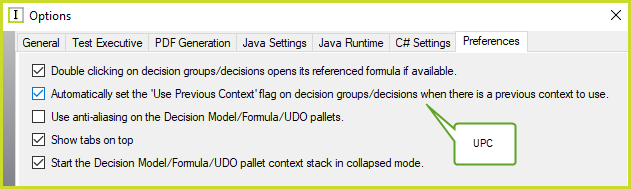
Figure 3-18d Use Previous Context flag option.
3.The ancestor decision group's colour changes when one of its descendant decision (group)s is selected"
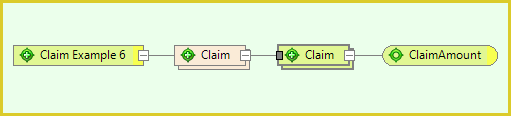
Figure 3-18e Ancestral Claim decision group on the left changes colour when descendant Claim decision group on the right is selected.
4.The Search can find decision (group)s that have an ancestor but no Use Previous Context flag:
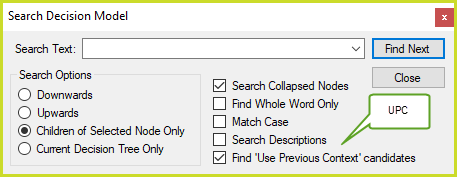
Figure 3-18f Search Decision Model for Use Previous Context candidates.
The Use Previous Context flag on the decision model palette is a different feature to the PreviousContext operator on the Process Control tab of the formula palette, see Previous Context.