Previous Context |
  
|
Previous Context |
|
PreviousContext is useful when you need to access two repeating context nodes within one operation. For example, when you want to compare each item in one list with all of the items in another list.
The Health Claim Processing repository has an example formula, Validate each item code, where each item in the list of claim item codes must be verified against the list of speciality codes for each Provider. These two lists occur in different schemas. The list of claim item codes appears as the Item repeating node in the Health Claim schema
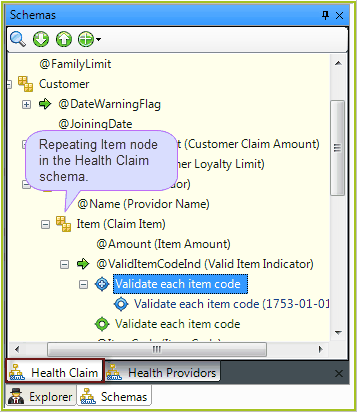
Figure 4-34: The Health Claim customized Schema
The list of speciality codes for each Provider appears as the SpecialtyCode repeating node in the Health Providers schema.
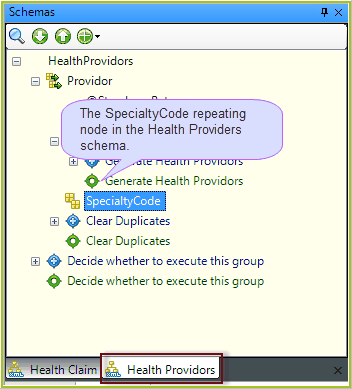
Figure 4-35: The Health Providers schema
A partial extract of the Validate Each Item Code formula is shown in Figure 4-36 below.
You can see that the formula context is iterating over the items in the Health Claim schema.
For each item, it shifts context to the Provider SpecialtyCode node in the Health Providers schema using the AnyNodeTrue node list operator (which is to the left of the formula and cannot be seen in the figure). This means that each Provider SpecialtyCode can be compared with the Health Claim Provider ItemCode, which is the previous context.
Health Claim Provider ItemCode is a repeating node and would usually be unreachable. However, by returning to the previous context, we can access the instance (a single value) of the node that is being iterated by the formula context
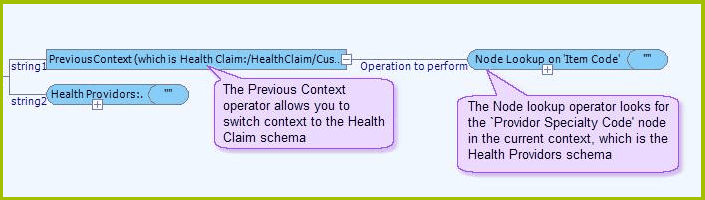
Figure 4-36: Extract from the Validate each item code formula
In Figure 4-37, you can see the Tree view of the formula, which helps to clarify the purpose of the formula.
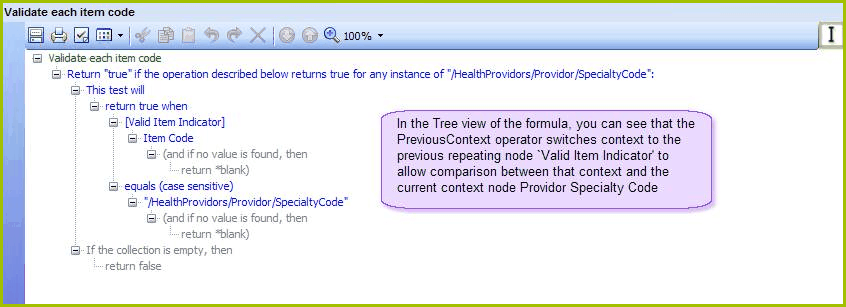
Figure 4-37: Tree view of the Validate each item code formula
NOTE: You will need to import the Health Claim Processing repository if you haven't already done so. The Health Claim Processing repository is found in the folder ..\Program Files\Idiom Software\IDIOM Decision Manager v4.5\Sample Repositories. See Importing a repository