Stepping Over a Decision |
  
|
Stepping Over a Decision |
|
The Step Over decision function is used when running an inline test and enables the test to proceed to the next decision or decision group, without stepping in to the one that the test is currently stopped on.
It does not stop the decision from executing its associated formula(s), but simply proceeds to the next decision on the decision model palette. The results of any stepped over decisions will only be updated to the debugger pane once either the 'Run' or 'Step Into' button are clicked.
STEPS
1. |
Open the Validate and Price Private Vehicle Insurance decision model and click on the Test Inputs button. |
2. |
Build an input document, or load an existing Input file (see Building an Input file). |
3. |
Specify a Break Point for your test (see Specifying a Break Point;) |
4. |
Start the test by clicking on the Run button |
5. |
Click the Step Over button |
6. |
Continue to click the step over button until you reach a decision you wish to step into. |
7. |
Click on the decision, or decision group that you wish to step over (e.g. Set Expiry Date) and click on the Debug | Step Over button |
The decisions you have stepped over will have been executed, however the execution results will not be updated to the Document Builder pane until the 'Run' or Step Into button is clicked.
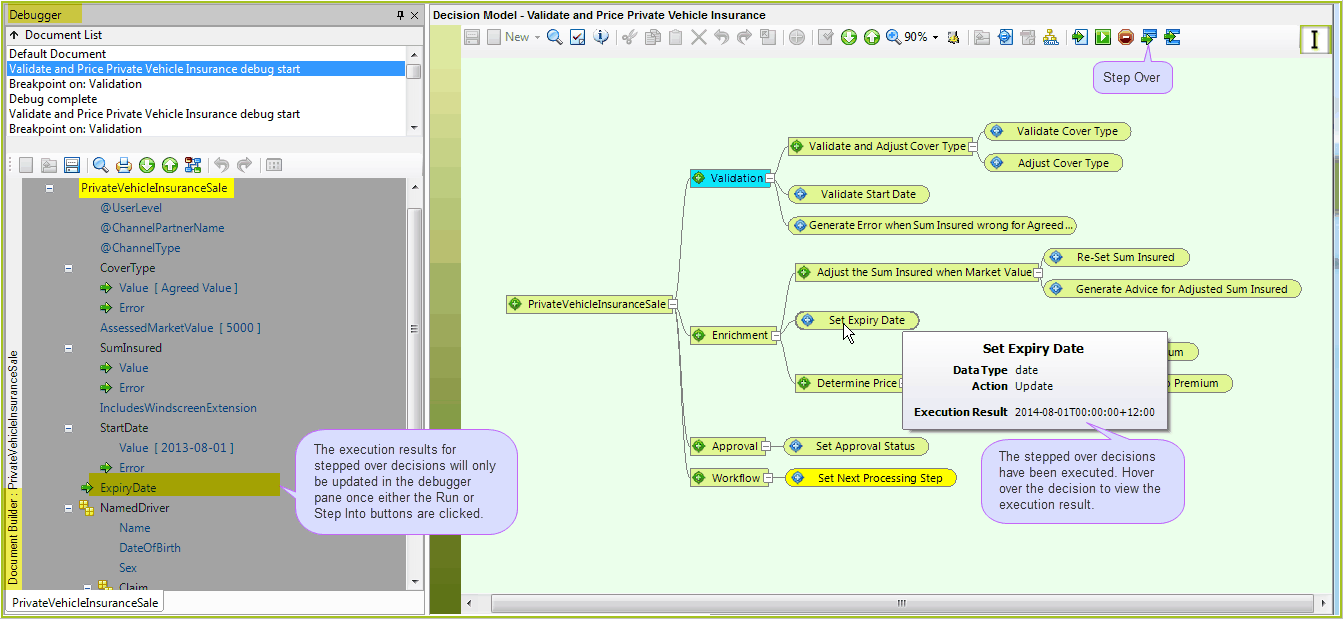
Figure 3-42(b) Step over a decision to move to the next decision or decision group, one step at a time.
8. |
Click the Run or Step Into buttons to update the execution results in the debugger pane and continue on with your testing. |

 (see

