Opening a Repository |
  
|
Opening a Repository |
|
This topic details how to open an existing repository that has already been imported into IDIOM. To follow the examples used in this manual, the System Administrator will first need to import the Vehicle Insurance repository and set up the users and workgroups within it (see About the Case Study and Importing a Repository). Decision designers will then be able to open it using the steps below.
To open an imported repository:
1. |
Click on `File' | `Open' |
2. |
Select the desired repository e.g. Vehicle Insurance Demo. |
3. |
Select the workgroup you wish to use to access the repository and your user role e.g. Private and Workgroup Administrator |
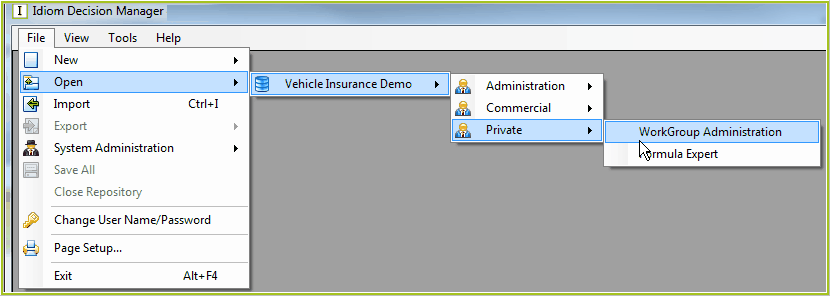
Figure 2-8: Opening a repository.
or alternatively, click on System Administration | Vehicle Insurance Demo:
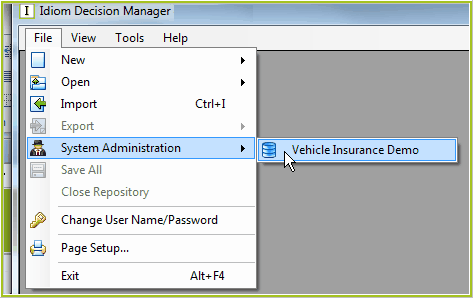
Figure 2-8b: Opening a repository.
IDIOM opens the repository.
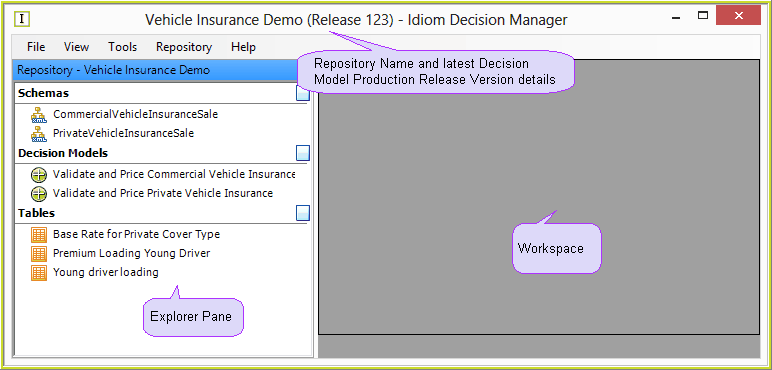
Figure 2-9: The Vehicle Insurance Repository
Tip |
You can close a repository without logging out of IDIOM by selecting 'File' | 'Close Repository'. |
The next few topics will help you to understand the different components of the IDIOM user interface. If you wish to skip ahead to more practical exercises, go to the topic Expanding and Collapsing Tree Views.