Importing a Repository |
  
|
Importing a Repository |
|
Only the System Administrator can import a repository.
STEPS To import an existing IDIOM repository:
1. |
Log into IDIOM and select 'File' | 'Import' > Import dialog box |
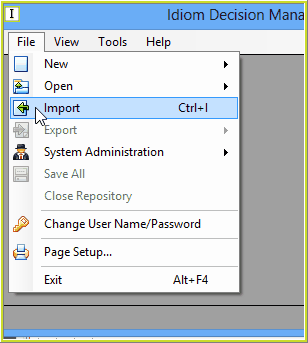
Figure 6-20: Importing a Repository
2. |
Select the appropriate repository and click on `Open' > Import Complete dialog box. |
Note that you can import files with both .xml and .idm extensions. Try importing the Vehicle Insurance and Health Claim Sample Repository files, which you can find in ..\Program files\Idiom Software\IDIOM Decision Manager v4.5\Sample Repositories
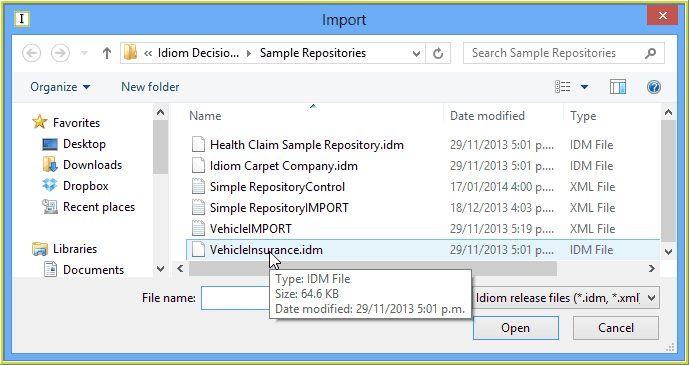
Figure 6-21: The Import dialog box
3. |
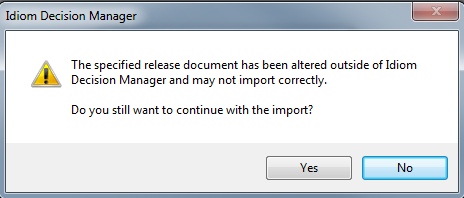
When the selected repository has been modified outside of the Decision Manager, a warning dialog will be presented to ask for confirmation to attempt the import. This means that the only way to properly prevent a repository from being imported by other licenses is by choosing to encrypt and restrict the release during the export process. |
4. |
Click on `Ok' |
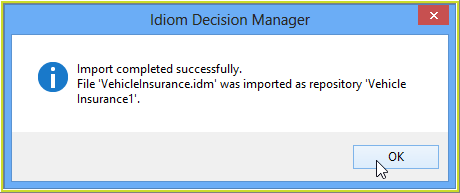
Figure 6-22: The Import Complete dialog box
5. |
Select 'File' | 'System Administration'. |
The new repository will now be listed in the selection menu.
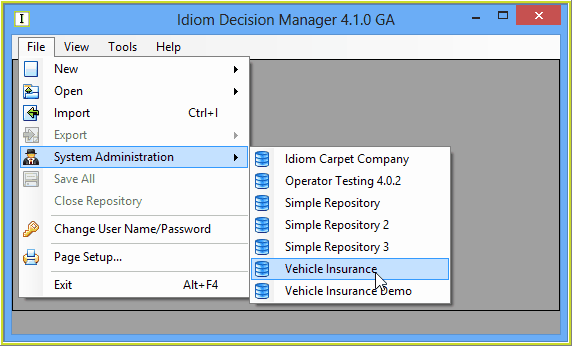 Figure 6-23(a): The Imported repository listed in the selection menu.
NOTE: If the name of the repository you are importing matches that of an existing repository, a dialog box will appear that informs you of this and allows you to change the name of the new repository.
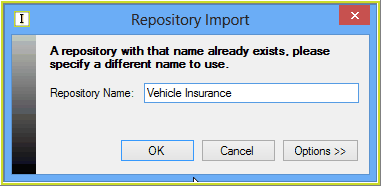
Figure 6-24: Repository name already exists dialog box.