Miscellaneous Hover Tab |
  
|
Miscellaneous Hover Tab |
|
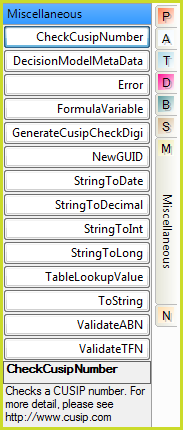
Miscellaneous Hover Tab
CheckCusipNumber |
Validates the Cusip number. For more information on CUSIP numbers please visit www.cusip.com. |
||||||||
DecisionModel MetaData |
Allows the user to retrieve information about the decision model to use in their rules. There are four modes:
|
||||||||
Error |
This operation allows formulas to stop the system in the event of a catastrophic error. This will cause the rule to notify an error to the host system, which could have serious consequences for the entire system. Therefore, this operator is only available through Administrator-defined configuration settings. |
||||||||
FormulaVariable |
Retrieve the value of a previously recorded formula variable of the specified name. Note that this operator always returns a string irrespective of the data type of the original variable. Use the 'StringTo...' operators in this group to convert the FormulaVariable to the required data type. Use StringCompare for booleans. The Boolean text value is determined by the 'Default ToString Format' of the Decision Model or Release Settings. |
||||||||
GenerateCusipCheckDigit |
Generates a check digit for a CUSIP number that does not have one. Please see www.cusip.com for more information. |
||||||||
NewGuid |
This operator will return a randomly generated unique ID. The operator has two modes: Standard - 00000000-0000-0000-0000-000000000000 Compressed - the compressed version returns a base-64 version of a standard GUID. |
||||||||
StringToDate |
A conversion of a String datatype to a DateTime datatype. |
||||||||
StringToDecimal |
A conversion of a String datatype to a Decimal datatype |
||||||||
StringToInt |
A conversion of a String datatype to an Int datatype. |
||||||||
StringToLong |
A conversion of a String datatype to a Long datatype |
||||||||
TableLookupValue |
Retrieve the value of a previously recorded table lookup value of the specified table and column names. See Table Lookup Values |
||||||||
ToString |
A conversion of datatype from Boolean, DateTime, Decimal, Int or Long to a string datatype. The formatting of the converted data can be set by right-clicking on the "ToString" operator and selecting 'Specify Custom Format", and then selecting the required format. See the example below**. |
||||||||
ValidateABN |
Validates an Australian Business Number and return true or false. |
||||||||
ValidateTFN |
Validates an Australian Tax File Number and return true or false. |
Table 8-3: Operators available from the Miscellaneous Hover Tab
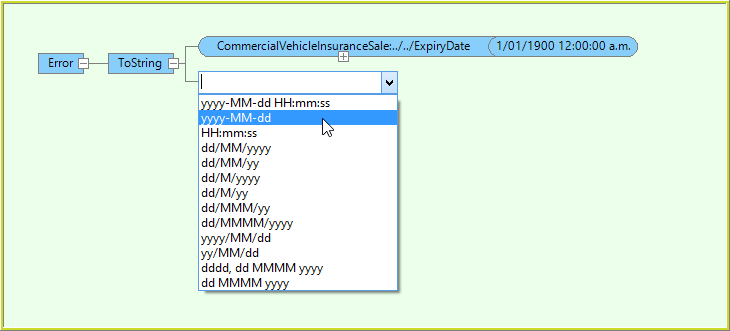
**Example of how to format data that is being set from a DateTime datatype using the 'ToString' operator.