Table Lookup Values |
  
|
Table Lookup Values |
|
All table lookup operations performed will now retrieve the values of all columns (key and data) and store it in the internal schema. Through the use a new operator called 'TableLookupValue', a user is able to retrieve the values of any column from the most recent lookup operation for a particular table.
For the purpose of demonstrating the new 'TableLookupValue' operator we will amend the Determine Young Driver Loading formula that was created in the section above.
We will alter the When True branch as follows:
•create a new IF statement that will perform a table lookup and populate the 'Loading Percent' value in the internal schema
•when this new IF statement is true, we will utilise the TableLookupValue operator to access the Loading Percent value from the internal schema.
Create a formula using the TableLookupValue Operator
1. |
Open the “Determine Young Driver Loading” formula that was created in the Formula (and UDO) variables example above. |
2. |
Delete the existing 'when true' branch of the formula and replace it with an 'IF' and 'Greater Than' Operator. |
3. |
Create a formula to perform a table lookup and check if the calculated Loading Fee is greater than a minimum charge of $120.00. (see Figure 4-70(a)). You will note this uses the new 'FormulaVariable' operator we created in the section above. |
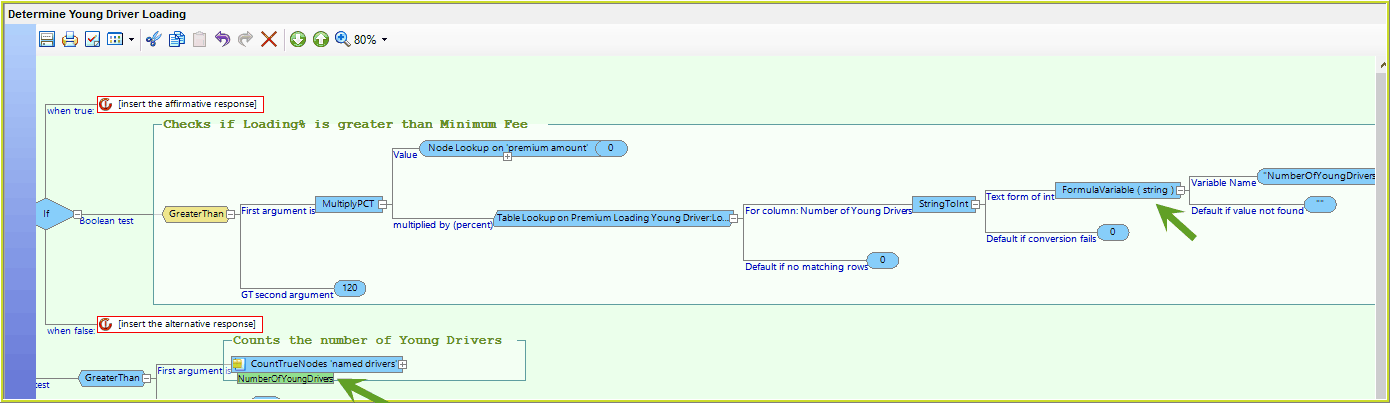
Figure 4-70(a) Perform table lookup to determine if loading percent amount is less than minimum fee
4 |
Update the associated 'When False' branch formula to add the minimum fee of $120.00 to the premium amount. (see figure 4-70b below) |
5 |
Update the 'When True' branch of the formula to utilise the TableLookupValue operator to access the Loading Percent value from the internal schema (see figure 4-70b below): a.Drag the AddPct operator on to the 'When True' element. b.Drag a node lookup on 'Premium Amount' on to the first value. c.Drag the “StringToInt” Operator on to the 'Plus (percent)' element. Note that the “StringToInt” is necessary here as all TableLookup Values are defined as Strings in the Internal Schema. d.Drag the new operator TableLookupValue (from the Miscellaneous operators menu) as the “Text form of int”. e.Enter the exact name of the Table and Column that you wish to lookup: 'Premium Loading Young Driver' and 'Loading Percent' respectively. |
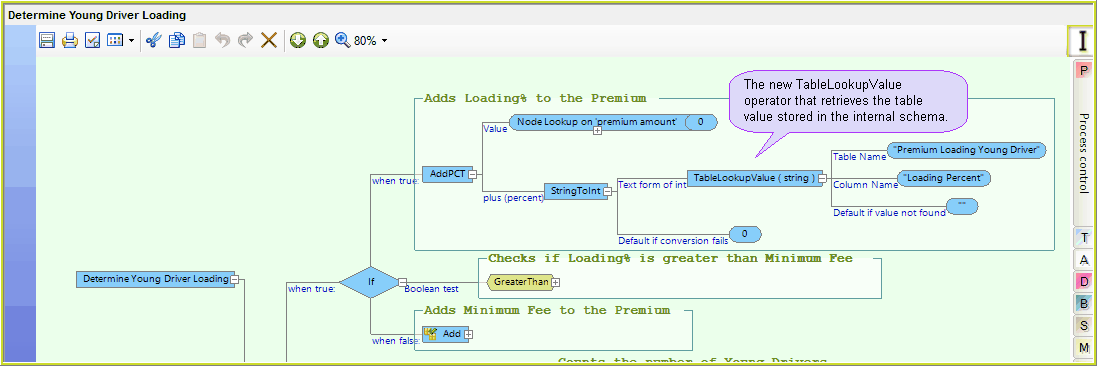
Figure 4-70(b) - the 'When True' branch uses the 'TableLookupValue' operator to look up the Loading Percent Value in the internal schema.
6 |
Save the updated formula |
The 'When True' argument now uses the TableLookupValue to retrieve the Loading Percent value from the internal schema..
Perform an In-line Test
1)Run in the debugger (See In-line testing) with a sample file that has one or more young drivers ie:
i.Set the Premium amount to $10,000.00
ii.Add two Named Drivers under the age of 25 years
iii.Run the debugger
The “Loading Percent” value is populated in the Internal Schema:
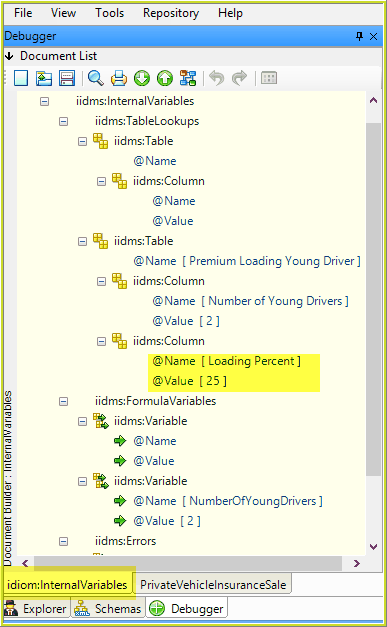
Figure 4-70(c) TableLookup 'Loading Percent' value in the Internal Schema
Note: The TableLookup Values are retained until a new table lookup is performed.
The in-line testing results will show a % increase in the premium based on the TableLookup “Loading Percent” value recorded in the internal schema. In this case, it is 25%:
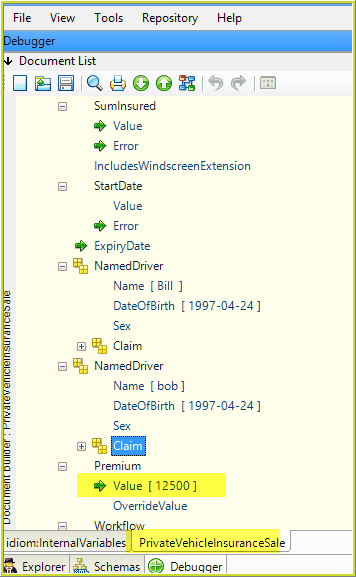
Figure 4-70(d) Debugger Results using TableLookup Value in the internal schema