String (Text) Manipulation Hover Tab |
  
|
String (Text) Manipulation Hover Tab |
|
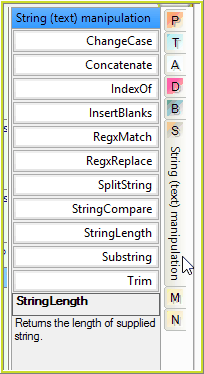
String Hover Tab
ChangeCase |
Changes the case of the selected text e.g. From lower to upper case. This is a modal operator i.e. Double click on the operator to select one of two modes `To Upper' or `To Lower'. |
Concatenate |
Evaluate all of the operations in the list and join them into a contiguous string (i.e. a string without any breaks). Use `InsertBlanks' if blanks are required between values. Unwanted blanks in the string may be removed using `Trim'. |
IndexOf |
Find a string within a string and return the integer of the position of the first letter of the substring. For example, Index of `and' in `shandy' returns the value 3. When the substring is not found 0 is returned. This operation is case sensitive. |
InsertBlanks |
Returns specified amounts of space. For example, when argument is 5 it will return ` ' i.e. 5 blank characters. Use this when concatenating to insert 1 or more blanks between the strings being concatenated. |
RegXMatch |
This operator allows you to search for text with a Regular Expression pattern. Returns `true' if any part of the given string matches the pattern; otherwise it returns `false'. The pattern can include standard regular expression syntax commands. e.g. ^[ABC].* will successfully match all strings that begin with A, B or C . Please refer to https://regexone.com/ for an introduction to regular expressions. |
RegXReplace |
Returns the given string with all occurrences of the given pattern replaced by the new string. |
SplitString |
Splits a string on a given delimiter and returns the string found prior to the index (the sequence number of the delimiter). An empty string is returned if the index is out of bounds. SplitString has two modes that determine how it treats the delimiter: string literal and regular expression. The SplitString operator in models created with versions earlier than 4.3 default to string literal mode. The regular expression mode allows you to specify multiple delimiters and complex delimeters, for example: •[,;-] to split the string abc,def;ghij-klm into abc + def + ghij and klm. •\D+ to split the string Abc1234Def5678Ghi9012Jklm into 1234, 5678 and 9012. •\d+ to split the string Abc1234Def5678Ghi9012Jklm into Abc, Def, Ghi and Jklm. The string literal mode can be used if the delimiters are Regex special characters (for example .*+?\) that should be treated as normal characters because a + or * are not valid regular expressions. |
StringCompare |
Compares strings and returns a boolean value depending on the selected mode. It has the following modal values: Equals (case sensitive) Does not equal (case sensitive) Equals (case insensitive) Does not equal (case insensitive) |
StringLength |
Returns the position of the last non-blank character in a string. Note that string values from elements are trimmed before their length is returned, whereas string values from attributes are not. For example, the value returned for the length of the string 'cover type is invalid' will be the same as that for 'cover type is invalid ' for elements but not for attributes.
|
Substring |
Select a string from within a string. Substringing the value starting at `3' for a length of `3' within the word `shandy' returns `and'. When the specified length is larger than the available number of characters, substring to end is returned. Start index is 1-based. |
Trim |
Removes leading and tailing blanks from a text string. |
Table 8-1: Operators available from the String Manipulation Hover Tab