Nodes Hover Tab |
  
|
Nodes Hover Tab |
|
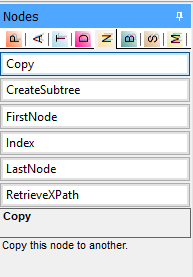
Nodes Hover Tab
Copy |
The purpose of the Copy operator is to facilitate copying the information on a source node over to a specified target node. The Copy operator has a control datatype and two modes: SchemaCompliant and AllNodes. These can be toggled by double clicking on the Copy operator and selecting the relevant option from the drop-down box. •SchemaCompliant - Copies only nodes defined on the target schema •AllNodes - Copies every descendant on the current context across to the target The Copy operator defines the context of the node that is to be copied. It takes the current context of wherever the operation is snapped onto. Every Copy operator needs a CopyTarget operator, which will automatically be added to it when the Copy operator is dragged onto the formula palette from the Nodes hover tab. The CopyTarget operator defines the context of the node that is to be the target recipient of the Copy operator. The content of the Copy operation's context is copied across to the context specified as the target. The CopyTarget operator also has a control datatype. It has three modes: •CreateIfNecessary - Creates the target node if it does not already exist, otherwise updates any existing node (only valid for non-repeating target contexts). •AlwaysCreate - Always creates a new target node regardless of whether one already exists (only valid for repeating target contexts). •Update - Updates the target node only. If the target node does not exist, nothing is done (valid for both repeating and non-repeating target contexts). The relevant mode can be selected once the target node has been dragged from the Customized Schema pane onto the CopyTarget operator in the formula palette. Simply double click on the operator and select the mode from the drop-down box. |
CreateSubTree |
Decisions and decision groups can be used to create attributes and elements individually using the Actions Create If Necessary, Create and Always Create. The CreateSubTree operator can be used to create multiple empty elements/attributes (that don't already exist) downward from the context of its decision. The Data Type of the decision has to be Control, see Decision menu items. This operator has two modes "exclude repeating nodes" and "include repeating nodes", the latter of which will create a single instance of each repeating element (that doesn't already exist). Note: Decisions with Data Type = Control always have Action = Update. The node for which to create empty child elements/attribute recursively has to exist for the CreateSubTree operator to work. Note that the CreateSubTree operator will only create Output attributes and elements as indicated by a green arrow ( |
FirstNode |
Returns 'true' if the current node is the first node of a collection. Note: The collection is as seen by the parent context node if defined by a decision group. |
LastNode |
Returns `True' if the current node is the last node of a collection. Note: The collection is as seen by the parent context node if defined by a decision group. |
Index |
Returns the sequence number of the most recent node accessed in a collection - this will either be the current node, or the closest repeating parent of the current node. If there are no repeating ancestors, the operation will return 1. |
RetrieveXPath |
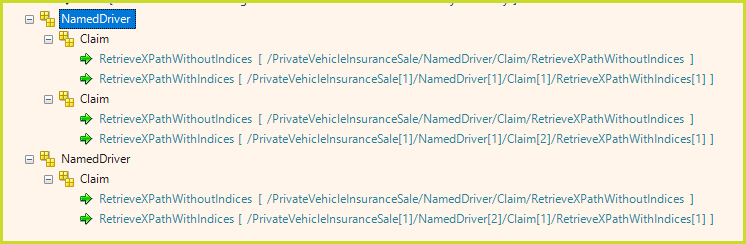
Returns the Xpath of the current context. This operator has two modes: Without Indices and Indexed. Figure 8-6 shows the value returned for these two modes. Note the .../Claim[2]/... and .../NamedDriver[2]/... values as examples of the indices for multiple nodes.
|
Table 8-6: Operators available from the Nodes Hover Tab
 ) to the left of their schema node.