Creating dynamic table contents |
  
|
Creating dynamic table contents |
|
The Dynamic TableSet.xsd schema for a dynamic table can be found in the C:\Program Files\Idiom Software\Idiom Decision Manager V4.5\Documentation directory:
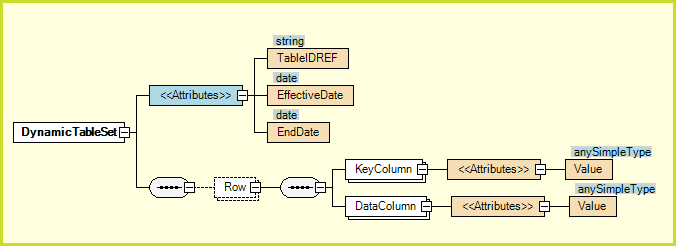
Figure 7-21(d) Dynamic TableSet.xsd
The best way to create dynamic table contents is to export an existing table contents to xml and modify the DataColumn Value attributes:
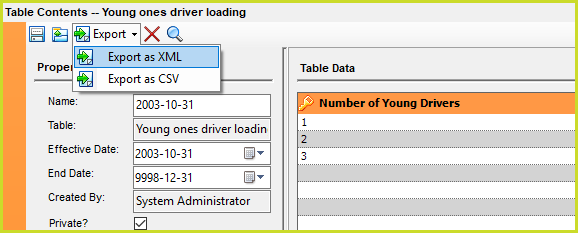
Figure 7-21(e) Export as XML
Open the exported xml file in an editor, modify the /DynamicTableSet/Row/DataColumn values. The value of the TableIDREF attribute is the Table ID property of the Table Definition. The EffectiveDate and EndDate properties have the yyyy-mm-dd format. The normal rules apply to these two dates so the dynamic table contents is only used if the model's Effective Date is between the two days.
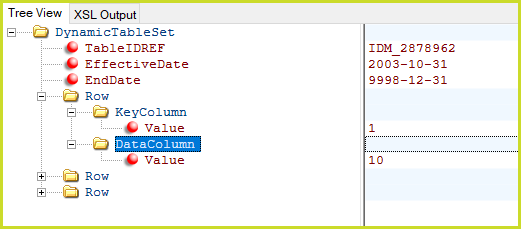
Figure 7-21(f) Exported Young driver loading table contents
The value of the TableIDREF attribute is the Table ID property of the Table Definition. The EffectiveDate and EndDate properties have the yyyy-mm-dd format. The normal rules apply to these two dates so the dynamic table contents is only used if the model's Effective Date is between the two days.
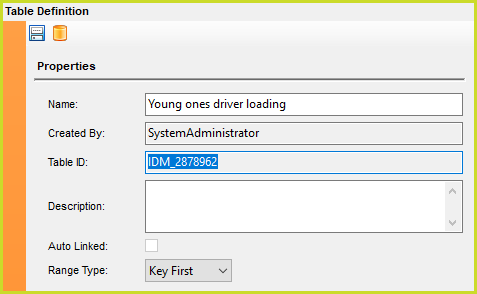
Figure 7-21(f) Table ID