Advanced Settings |
  
|
Advanced Settings |
|
The Test Executive Advanced Settings pane is found at the right of the Test Executive.
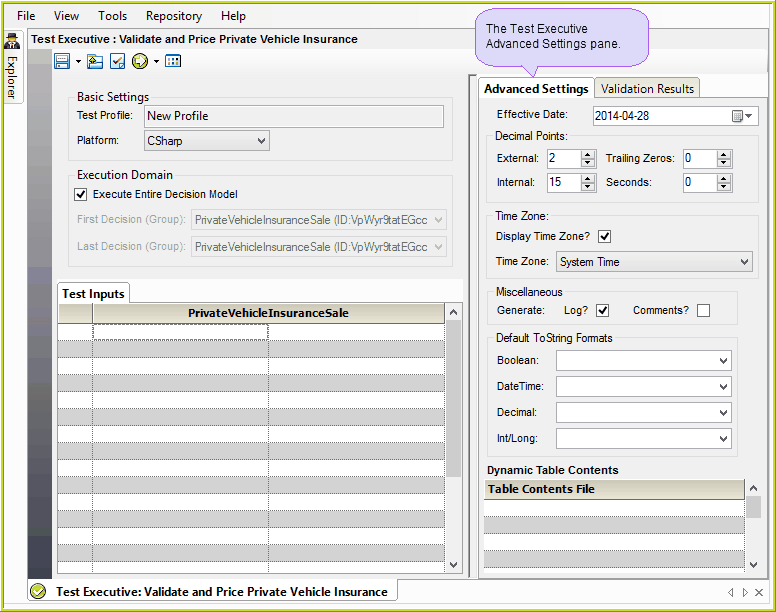
7-19 Test Executive Advanced Settings Pane
This pane allows you to alter a number of options that will have a direct impact on the results generated by the Test Executive.
When you first open the Test Executive, the 'Advanced Settings' default to the same settings as saved in the Decision Model Properties. However, these settings are specific to the Test Executive and may be altered prior to running. When running the Test Executive, these settings will override any settings that may be set in the Decision Model Properties , or in the Repository Release 'Edit Generation' Settings Tab.
It is particularly important that the 'Decimal Points' precision options are set correctly, particularly if you are comparing the results with previously prepared 'Expected Output' files.
The table below provides a brief overview of the Advanced Settings:
Item |
Function |
External decimal places |
This function specifies the number of decimal places to use for decimal values in the following situations: •If the value is output by a decision. •If a formula uses relational operators e.g. <, >, =, <=, >=, not=. By choosing external decimal places you can specify the precision that both numbers are rounded to before the relational operator is performed. •The number specified may not be greater than the setting for the 'Internal decimal places', it must be a non-negative integer, and the default setting is 2. |
Trailing Zero's |
This function specifies the number of trailing zero’s to use for decimal values in the following situations: •If the value is output by a decision. •The number specified may not be greater than the setting for the 'External decimal places', it must be a non-negative integer, and the default setting is 0. |
Internal decimal places |
This function is optional and specifies the number of decimal places to use for decimal values in the following situations: •When IDIOM performs division operations - decimals are represented internally as java.math.BigDecimal, which requires rounding when performing division •When IDIOM uses the RaiseToPowerOf operation •The number specified must be a non-negative integer, and the default setting is 15. |
Seconds |
Specifies the number of seconds to be included in a date. |
Time-zone |
This field enables you to specify the timezone that is to be used when: •reading timezone unspecified date/datetime data •outputting date/datetime data You can select the appropriate timezone from a drop-down box in the Release screen |
Generate Logs |
Enables you to specify whether or not a log will be kept. This log will contain information such as the operational outcomes of formulas you have chosen to `trace at runtime' (see Extra Formula Functions). If the check-box is checked then a log will be kept. The log results can be viewed in the Test Executive Console > Idiom Runtime Execution Tab (this can be opened by clicking on the Show the Execution Console button |
Generate Comments |
Enables you to specify whether or not source code comments are generated. If the check-box is checked then comments will be generated. ie: /** * ID : O1qatMIIm7k_moDLEVARJaA * Name : Int * CreatedBy : SystemAdministrator * ChangeSet : 163 * WholeNumberCalcMode : int * EffectiveDate : 1753-01-01 * Review : false * Version : 0 **/ |
Default To String Formats |
Enables you to override the formatting of the converted data, when Boolean, DateTime, Decimal, Int or Long datatypes are converted to a String datatype using the ToString Operator in a formula. (See Miscellaneous Hover Tab - ToString Operator) |
Table 7-1: Options available in the Optional Release Settings table
A dynamic set of Table contents is a Table that contains data that is different from the Table content which is currently retained in the IDIOM repository. By uploading a dynamic set of Table contents, you can replace the existing Table contents in IDIOM and trial the results of the runtime generation using the new Table contents. This is useful if you wish to compare results from previous years or if you want to determine what the results may be using projected data.
See Loading Dynamic Sets of Table Contents
