Running Validation From the Test Executive |
  
|
Running Validation From the Test Executive |
|
In the Test Executive, validation is automatically completed prior to compilation when you execute a test. (See Build and Test)
If there are any validation errors during testing, these will be displayed in the Validation Result pane to the right of the main Test Executive workspace.
In the example below we have removed the Young Driver Loading table from the repository prior to executing our test in the Test Executive. The error message displays in the Validation Results pane to the right of the Test Executive
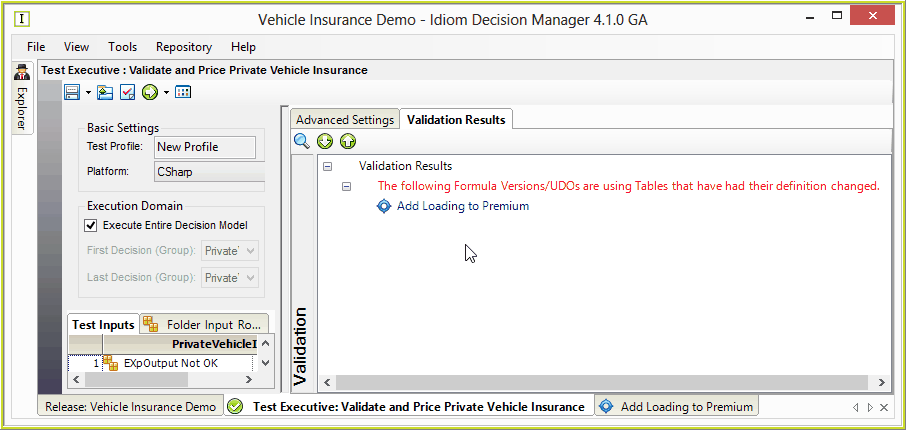
Figure 7-23(a): The Validation Results pane indicating that validation errors have occurred.
If you do find that you need to correct a validation error, simply double-click on the item in the Validation results pane and it will open the appropriate screen e.g. the Formula Version pane:
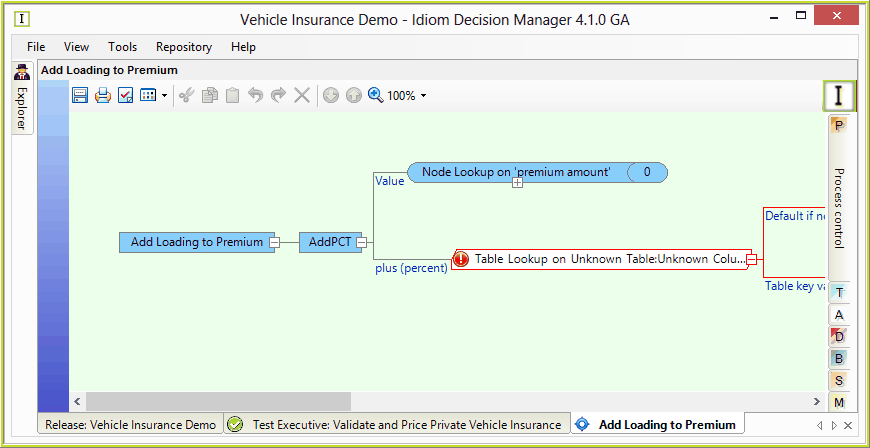
Figure 7-23(b) The affected Formula Version pane as displayed in the Validation Results screen.
Some errors are can be considered fatal and will prevent IDIOM from compiling at runtime. (See Validation Messages). You will need to fix any critical errors before you can run your tests.
If there are no errors, the Validation Results pane will display the message: 'There are no validation errors or warnings'.