Production Release Generation Settings |
  
|
Production Release Generation Settings |
|
To edit the Production Release generation settings you must first open the Production Release Settings dialog box, see Production release settings .
You need to decide whether or not to use the default settings for your release - (refer to the topics above).
The generation settings available in the Production Release Settings dialog box are similar to the options available for a local release generated from the Decision Manager client, however with a production release, path variables can be substituted into some paths.
The following diagram is an example of how the path variables can be used as arguments for the Pre and Post build actions and to define the Build Action paths in the Production Release Settings dialog box:
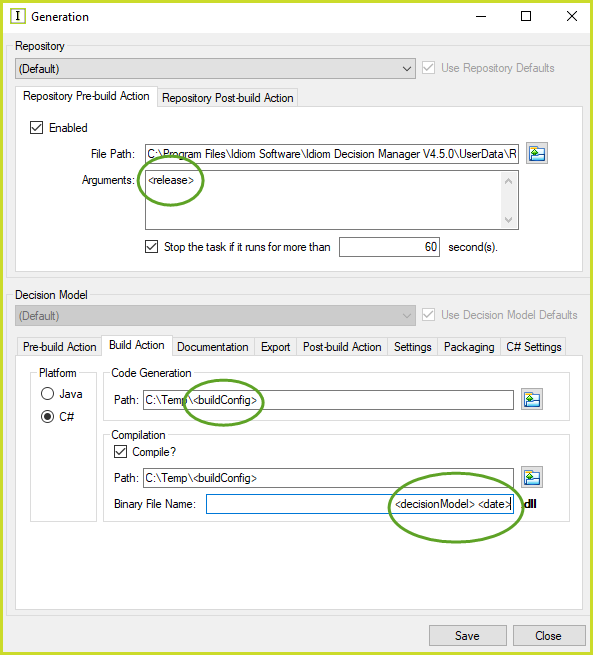
Figure 7-35(a): Using path variables in the Productions Release Settings Editor:
The Production Release will use these path variables to define the Binary File Name's path folders for the generated .dlls:
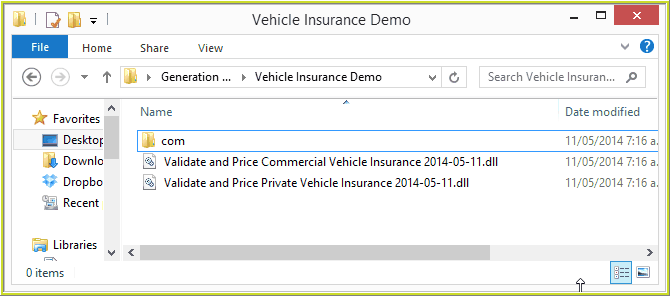
7-35(b): Generated dll files using path variables in the Productions Release Settings Editor
Path Variables
Variables can be substituted into many of the paths and arguments that can be specified. The following is a list of the currently available path variables:
· |
<buildConfig> or <buildConfiguration> -The Build Configuration selection in the Production Release dialog box, see Using IDIOM decision manager to perform the production release . |
· |
<productionReleaseVersion> -The production release version of the decision model being released. |
· |
<repositoryID> - The ID of the repository being released. |
· |
<release> - The name of the repository being released |
· |
<repositoryNoSpaces> - The name of the repository being released, but without any spaces |
· |
<decisionModelID> - The ID of the decision model being released. |
· |
<decisionModel> - The name of the decision model. |
· |
<decisionModelNoSpaces> - The name of the decision model being released, but without any spaces. |
· |
<package> - The package name of the decision model being released. |
· |
<packagePath> - The package name of the decision model being released, but with all '.' characters replaced with '\' characters. NOTE: This variable will create folders and place the artefact inside. It cannot be used in the Binary Name field in the Build Action Tab. |
· |
<date> - Date in yyyy-MM-dd format (eg. 2014-05-02). |
· |
<time> - Time in HHmmss format (eg. 123000). |
· |
<dateTime> - Date and time in yyyy-MM-dd_HHmmss format (eg. 2014-05-02_123000). |
· |
<shortTime> - Time in HHmm format (eg. 1230). |
· |
<year> - 4 digit year number (eg. 2014). |
· |
<month> - 2 digit month number of the year (eg. 05). |
· |
<monthShortName> - Month short name (Jan, Feb, Mar, Apr, May, Jun, Jul, Aug, Sep, Oct, Nov, Dec). |
· |
<monthName> - Month full name (eg. January, February, March, etc.). |
· |
<day> - 2 digit day number of the month. |
· |
<dayShortName> - Day short name (eg. Mon, Tue, Wed, Thu, Fri, Sat, Sun). |
· |
<dayName> - Day full name (eg. Monday, Tuesday, Wednesday, etc.). |
· |
<hour> - 2 digit hour portion of the time in 24 hour format, 00 to 23. |
· |
<minutes> - 2 digit minutes portion of the time, 00 to 59. |
· |
<seconds> - 2 digit seconds portion of the time, 00 to 59. |
· |
<changeSet> - Change set number of the decision model being released. |
· |
<userName> - Name of the user that started the Production Release. |
The above path variables can be substituted into:
· |
Pre/Post-Build arguments on the Pre-build Action and Post-build Action tabs; |
· |
Code Generation Path on the Build Action tab; |
· |
Compile Path on the Build Action tab; |
· |
Binary File Name on the Build Action tab; |
· |
Documentation File Path on the Documentation tab; |
· |
Export File Name on the Export tab;. |
· |
Packaging File Path on the Packaging tab. |