Table Operators |
  
|
Table Operators |
|
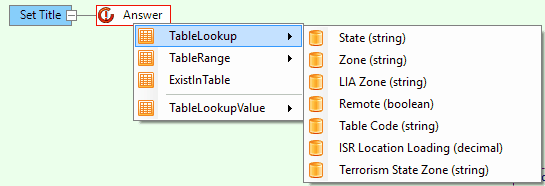
Table Operators become available when a table is dragged on to the formula palette.
TableLookup |
Used to retrieve a value from a table. Simply drag the table on to the node on the formula palette, and select the Data Column that the value is to be retrieved from. Then define the Key search criteria for searching the key column/s. |
TableRange |
Retrieve a ranged value from a Table by dragging a table that has a Key with the Range option selected. The key used will include a range value which will be moved up or down depending on the mode to the next key value in the table if it is not an exact match e.g. Keys: •0 •5 •10
For Table RangeUp, if the value 4 is supplied, the key value used will be 5. If the value 5 is supplied, the key value used will be 5. Decimal values can be supplied for keys which are an integer datatype. Decimal values are converted to integers before the comparison is made. Conversion of decimal to integer is by truncation. For example: •For Table RangeUp, if the value 5.99 is supplied, the key value used will be 5 •For Table RangeDown, if the value 4.99 is supplied, the key value used will be 0
If there is no key value in the table to range up or down to, then the 'if null' value of the Table operation will be returned. For example: •For Table RangeUp, if the value 11.00 is supplied, the 'if null' value of the Table operation will be returned.
|
ExistInTable |
Use the supplied key values ( and search all rows for a match. Return true if one or more of the selected rows have the supplied values. |
Table 8-8: Operators available from the Table Hover Tab