Linking Decisions/Groups to Schema Nodes |
  
|
Linking Decisions/Groups to Schema Nodes |
|
Decisions and decision groups need to be given a context, that is they need to be attached to nodes in the schema so that IDIOM knows how to process them at runtime (see Ordering Decisions for Runtime Processing).
To associate a decision with the appropriate schema node:
STEPS
1. |
Once you have created your decision/s, you can drag the relevant node from the customized Schema pane onto the decision/group in the decision model. For example, you could drag the Cover Type Value node from the PrivateVehicleInsuranceSale customized Schema pane onto the new decision group you created earlier in Creating Decisions and Decision Groups. |
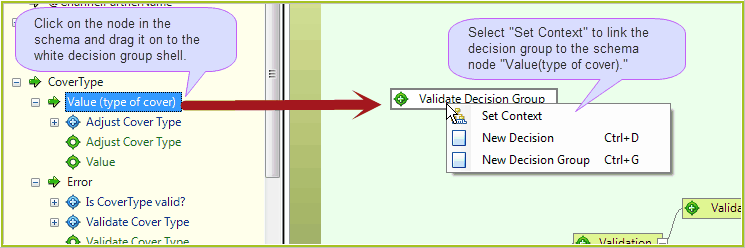
Figure 3-7(a): Associating decisions with schema nodes
2. |
When you drag a node on to a decision group, a dialog box appears with 3 options: •Set Context - this links the selected decision group to the node i.e. sets the node as the context node for that decision group. •New decision - this attaches a new decision with the schema node set as the context node •New decision group - this attaches a new decision group with the schema node set as the context node |
3. |
Here, select `Set Context'. The node will then be linked to the decision group. |
4. |
Click on the Save button. |
The decision group in the decision model will change from white to mid-green, indicating that it has been associated with a node on the schema.
Tip |
Use the same process if you need to change the context node for a decision/decision group. |
Once you have saved your changes, the decision will also appear in the customized Schema pane.
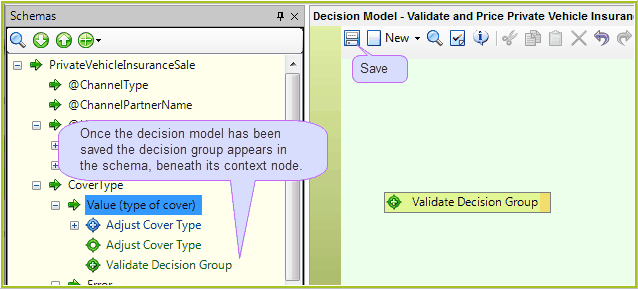
Figure 3-7(b): A decision group associated with a schema node.