Terminating iteration |
  
|
Terminating iteration |
|
Regardless of whether the decision/decision group is iterating because of data or process, it can be termination by executing the following operations in a formula.
The decision operators that can be used to exit or abort the decision are available in the Process Control hover tab.
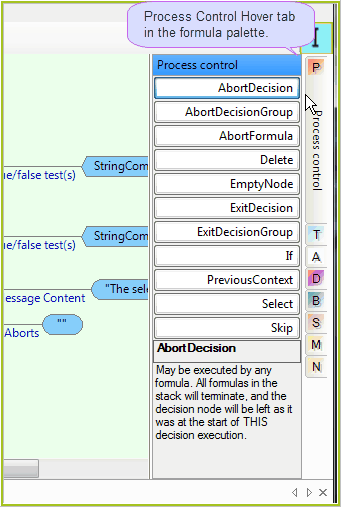
Figure-3-6(b) Decision Operators
| 1. | ExitDecision(Current Iteration) - exits the current iteration of the decision at the point where the exit operator is executed, without rolling back any modifications made, and continues on to the next iteration of the same decision, or the next decision or decision group in the set if there are no more iterations required. The modifications in this case can only be the creation of nodes caused by the Decision’s ‘Action’ parameter, as by definition, the decision cannot have produced a value result. |
| 2. | ExitDecision(Complete) - completely exits the decision at the point where the decision command is returned, without rolling back any modifications made to the context document, and continues on to the next decision or decision group in the set. |
| 3. | AbortDecision(Current Iteration) - exits the current iteration, rolls back any modifications made by the decision up to the point the command is received, and continues on to the next iteration of the current decision or the next decision or decision group in the set if there are no more iterations required. |
| 4. | AbortDecision(Complete) - completely exits the decision, rolls back any modifications made to the document by the decision, and continues on to the next decision or decision group in the set. |
Note: The above abort and exit decision (Current Iteration) operations can also be used on decisions under a repeating decision group. They will instead exit or abort the current decision and move onto the next decision under the repeating group. If used on the last decision in the group, either command will just make the repeat start again from the first decision.