How to Alter the 'Action Type' |
  
|
How to Alter the 'Action Type' |
|
To access and amend the `Action Type' function for the Adjust Cover Type formula:
STEPS
1. |
Open the Validate and Price Private Vehicle Insurance decision model |
2. |
Right-click on the decision Adjust Cover Type and select `Action'. You will see that the `Update' box is ticked. This means that this decision has an `Update' Action Type. |
3. |
You can change this Action Type by clicking on one of the other available Action Types e.g. Create If Necessary. |
Tip |
•'Ctrl' + '\' toggles the Action Type |
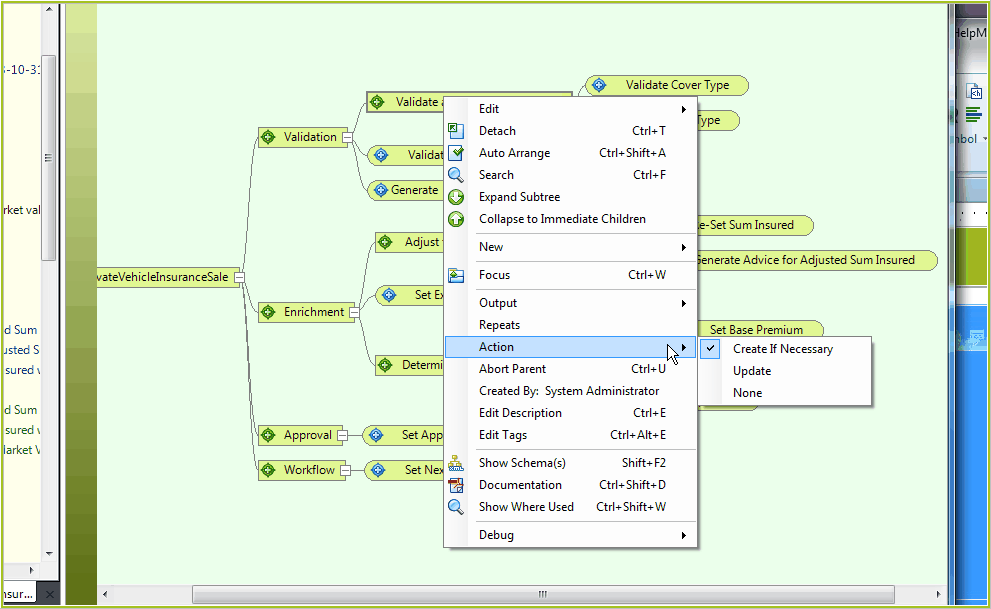
Figure 3-35(a): Alter the Action Type
Alternatively you can alter the Action Type using the decision Details panel:
1. |
Click on the decision Adjust Cover Type |
2. |
.Click on the 'Show Details Panel' button |
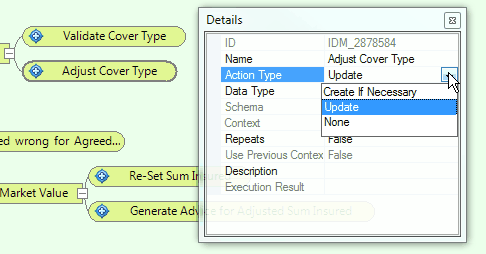
Figure 3-35(b): Alter the Action Type in Details panel.
3. |
Click on the Save button. |
