Creating a Test Profile |
  
|
Creating a Test Profile |
|
Once you have configured your basic settings you can save these settings as a Profile. This saves you having to redefine the input files and the first and last decision group settings every time you want to run a test.
STEPS to create and save a Profile:
1. |
Click on the Save button and choose either |
(a) 'Save Profile' - to save the Profile with the current name, or
(b) 'Save Profile As' - to give the Profile a new name.
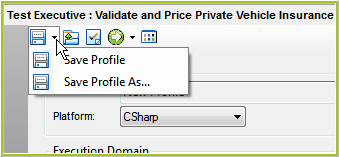
Figure 7-9: How to save a profile
STEPS to load an existing Profile:
1. |
Click on the 'Load Profile' button |
2. |
Select the desired Profile |
3. |
Click on Open |
IDIOM will then load the Basic Settings from this Profile. There is no limit to the number of Profiles that you can save.
 to got to the folder where the profiles have been saved (Default = ..\Program Files\Idiom Software\IDIOM Decision Manager V4.5\TestExecutive).