Create a Control Decision Model |
  
|
Create a Control Decision Model |
|
Create a Control Decision Model
For the purpose of demonstrating this functionality we will make modifications to the 'Vehicle Insurance Demo' repository. We will demonstrate this with the simplest form of implementing the control decision model – in an ‘unconditional’ manner - where the control decision model contains no conditional logic. Instead it executes each ‘specialist’ decision model in a pre-defined sequence, regardless of whether a specific ‘specialist’ decision model is required for this particular Motor Vehicle Insurance application. The use of the control decision model in a ‘conditional’ manner – where it does contain logic that determines if a specific ‘specialist’ decision model is required to be executed – is discussed at the end of this section of the manual.
At present all the decision logic for processing private vehicle insurance is contained within the 'Validate and Price Private Vehicle Insurance' decision model. We will change this model so that separate 'specialist' decision models are created for the specialised tasks of:
•Performing the standard insurance application checks and calculating the base premium (the existing “Validate and Price private Vehicle Insurance” decision model)
•Determining the premium loading associated with one or more young drivers (a new “Young Driver Loading” decision model)
•Determining the premium loading associated with one or more previous claims (a new “Claim Loading” decision model)
•Determining the approval status of the application (a new “Status” decision model).
We will create a new control decision model ‘Vehicle Insurance Control Model’, which will control the execution of the above ‘specialist’ decision models.
STEPS
1. |
Import the standard 'VehicleInsurance.idm' repository (..\Program Files\Idiom Software\IDIOM Decision Manager v4.5\Sample repositories/VehicleInsurance.idm). (See Importing a Repository) |
2. |
Open the repository administration pane (Repository | Administration>Repository Administration pane) and rename it to ‘VehicleInsuranceControl’ |
3. |
Create a new decision model, name the new decision model ‘ControlModel’, and then add the ‘PrivateVehicleInsuranceSale’ schema to the list of schemas (See Creating a new Decision Model) |
4. |
In the ControlModel properties dialog box tick the 'Control Decision Model?' check-box to set this decision model to be a control decision model. |
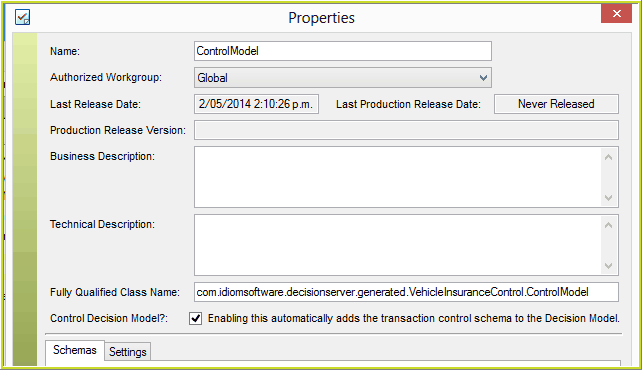
Figure 3-80 Control Mode toggle button in the Decision Model Properties dialog box
5. |
Save the decision model. |
By setting this to be a control decision model, the 'TransactionControl' source schema has been automatically added to the repository:
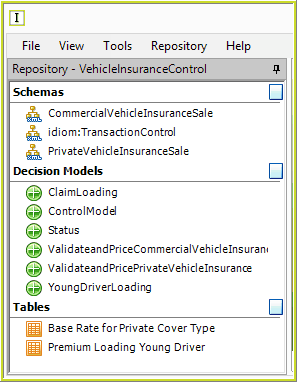
Figure 3-81(a): TransactionControl source schema is added to the Repository
And also to the schema list (in the properties dialog box) for the control decision model:
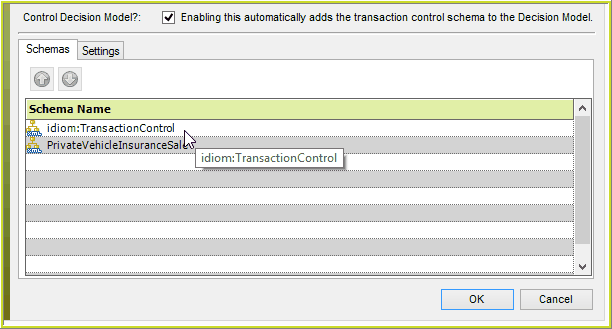
Figure 3-81(b) TransactionControl schema is automatically linked to the Control Decision Model
About the Transaction Control Schema
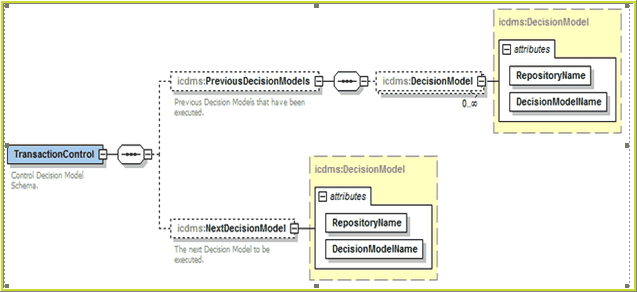
Figure 3-81(c) TransactionControl schema is automatically linked to the Control Decision Model
The 'Transaction Control' schema is added in its standard form. This schema keeps an audit trail of all decision models called (via the 'DecisionModel' collection under the 'PreviousDecisionModels' node), and rules update the next decision model to be called (via the 'NextDecisionModels' node).
While users can add variable nodes, the base schema and the elements/attributes shown above will be read-only – except for the 'NextDecisionModel' node.
A decision model can have its control mode removed, but the transaction control schema will remain referenced until the user removes it manually.
Deletion of the transaction control schema is allowed only if it is not in use by any decision models (as is the case with standard schemas).
In the event that a control decision model attempts to invoke a decision model that is either invalid or missing, the Decision Server will simply throw a ‘NoSuchDecisionModelException’ and execution will be halted (which is the standard behaviour when executing standard decision models).