Toggle Multiple Alias Edit Mode |
  
|
Toggle Multiple Alias Edit Mode |
|
Idiom now supports bulk editing of Alias names in the schema pane via the 'Toggle Alias Edit Mode' button on the toolbar.
STEPS
1. |
Click the 'Toggle Alias Edit Mode' icon to turn the Toggle Alias Edit Mode on. |
A blue box appears around the Toggle Alias Edit Mode to indicate the function is toggled on, and Idiom and the 'edit alias' field automatically displays and enables you to edit the alias when you click on any editable nodes in the schema.
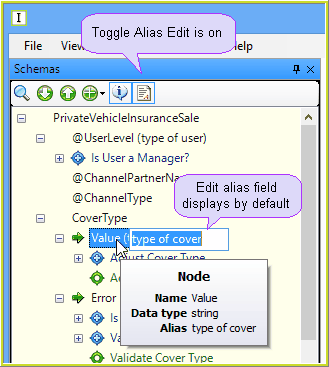
Figure 4-26: The Toggle Alias Edit Mode is toggled on.
2. |
Click on the 'Toggle Alias Edit Mode' icon again to turn the Toggle Alias Edit Mode off. |
The blue box around the 'Toggle Alias Edit Mode' button is removed to indicate the function is toggled off, and Idiom no longer automatically displays the 'edit alias' field in the schema.
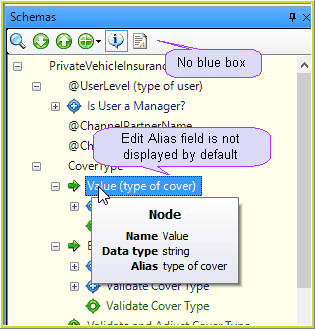
Figure 4-27: The Toggle Alias Edit Mode is toggled off.