Process iteration |
  
|
Process iteration |
|
To make a decision/decision group execute repeatedly, right-click on the decision/decision group and click on 'Repeats'. A small circular 'repeats' icon will appear above the repeating decision/decision group.
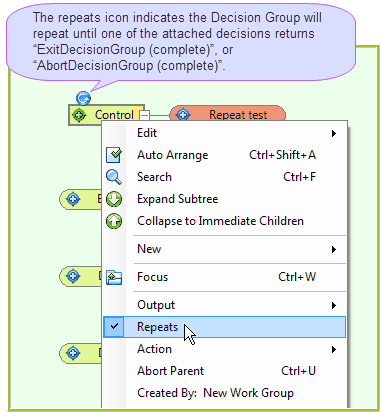
Figure 3-6(a) Creating a repeat Decision Group
The decision/decision group will now execute repeatedly until a decision executes an Exit or Abort operation, which is generally done when the correct number of nodes has been created.
While the repository validator will attempt to identify valid points of exit, it is unable to guarantee that these points of exit are actually reached during runtime. If the rules developer writes their point of exit logic in such a way that it never actually gets hit for one reason or another, then an infinite loop will occur.
Otherwise, if no valid points of exit are provided, the user will see the error validation message below during runtime.

Figure-3-6(c) Repeating decisions validation results