Node List Operators |
  
|
Node List Operators |
|
Node List Operators
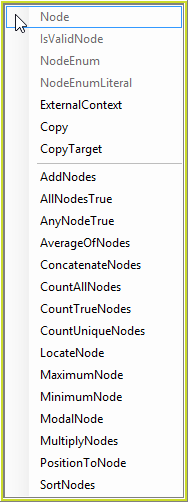
NOTE: the selection of Node List Operators available depends on the type of node that has been dragged on to the decision model formula palette.
AddNodes |
Evaluate the operation for all of the elements in a collection, and sum the results. When the target node collection is empty, return the default value. |
AllNodesTrue |
Evaluate the operation for all of the elements in a collection, and return true if all elements return true. When the target node collection is empty, return the default value. |
AnyNodeTrue |
Evaluate the operation for all of the elements in a collection, and return true if any element returns true. When the target node collection is empty, return the default value. |
AverageOfNodes |
Evaluate all of the elements in a collection, and return the average value (sum the total and then divide by the number of elements). |
ConcatenateNodes |
Evaluates and concatenates nodes in a node list according to a given expression, inserting a delimiter between them. |
CountAllNodes |
Count all of the elements in a collection. |
CountTrueNodes |
Evaluate the operation for all of the elements in a collection, and count those that evaluate to True. |
CountUniqueNodes |
Iterates the specified node list, evaluating given expression for each node, then returns the number of unique values. |
ExternalContext |
Used to access information under a node that has a different parent to the current context node. |
IsValidNode |
Look up the node, and return true if it holds a valid value for the node’s datatype. If the node is missing, or it is empty, return false. Blanks are considered as invalid values for string datatype. |
LocateNode |
Evaluate all nodes in a collection and return the index (i.e. sequence number) value of the first node that evaluates to true. |
MaximumNode |
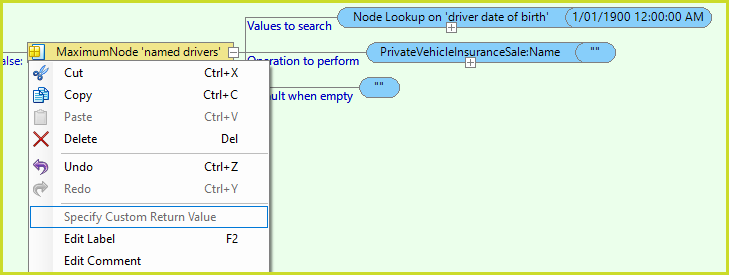
Evaluate the operation for all of the elements in a collection, and return the largest value or a different value, for example, find the node with the maximum DateOfBirth and return the node's Age. By default the MaximumNode and MinimumNode list operators have two parameters Values to search and Default when empty. Right-click and select the Specify Custom Return Value option to add a third parameter Operation to perform. The example below shows how to use this parameter to return the name of the youngest driver. The Specify Custom Return Value menu option is not a toggle. It is disabled once selected. Delete the Operation to perform parameter to deselect this option.
|
MinimumNode |
Evaluate the operation for all of the elements in a collection, and return the smallest value. The MinimumNode operator also supports the above Specify Custom Return Value feature. |
ModalNode |
Evaluate the operation for all of the elements in a collection, and return the most frequently occurring value |
MultiplyNodes |
Evaluate the operation for all of the elements in a collection, and then compound (multiply) them together. |
Node |
Retrieve the value of the nominated node. A node is an XML term for a field (element or attribute) that holds user data. |
NodeEnum |
Return `true' if the value retrieved from the node equals the value selected from that nodes declared enumerations (case-sensitive). If they are equal, return true; else, return false. |
NodeEnumLiteral |
Allows you to select an enumeration value to be set as a literal value when you drag a enumerated node on to the decision model palette. |
PositionToNode |
Move the context to the nth node in the collection as indicated by the index, and process the nominated operation for that node only. |
Table 8-9: Operators available from the Nodes Hover Tab and Right-Click Menu Items.