Specify Error Messages |
  
|
Specify Error Messages |
|
Error messages can now be defined on certain 'Abort/Exit' style operations.
Right clicking on these operations now allows the user to click on a 'Specify Error Message' menu-item.
This adds another argument to the operator for the user to specify a custom error message that gets added to the internal variables schema document during runtime whenever the Abort/Exit operator is executed.
The following operators support the additional error message argument:
•AbortFormula
•AbortDecision
•AbortDecisionGroup
•ExitDecision
•ExitDecisionGroup
•EmptyNode
For the purpose of demonstrating the new 'Specify Error Message' menu-item operator, we will amend the Determine Young Driver Loading formula that was created in the Table Lookup Values section above.
Specify an Error Message
1. |
Open the “Determine Young Driver Loading” formula that was created in the example above. |
2. |
Right-click on the 'ExitDecision (Complete)' element and select the 'Specify Error Message' Menu Item |
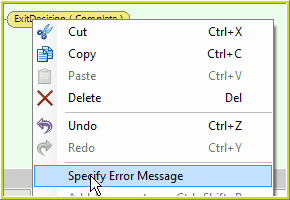
Figure 4-71(a)
3. |
Enter an appropriate error message to display in the internal schema, if the 'ExitDecision (Complete)' is used - 'Test Error Message One' in this example. |
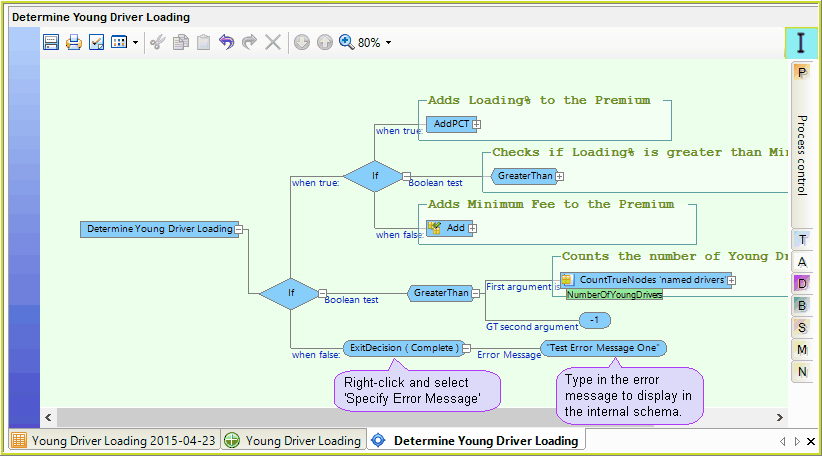
Figure 4-71(b) Specify Error Message on an 'ExitDecision' Operator.
4. |
Click Save. |
A new error message 'Test Error Message One' will be populated to the internal schema whenever the 'ExitDecision' Operator is used.
Perform an In-line Test
1)Run the debugger (See In-line testing) with a sample file that does not have any young drivers ie:
i.Set the Premium amount to $10,000.00
ii.Do not add any Named Drivers under the age of 25 years
iii.Run the debugger
The specified error message is displayed in the InternalVariable schema, together with the Source Formula, and Source Decision name.
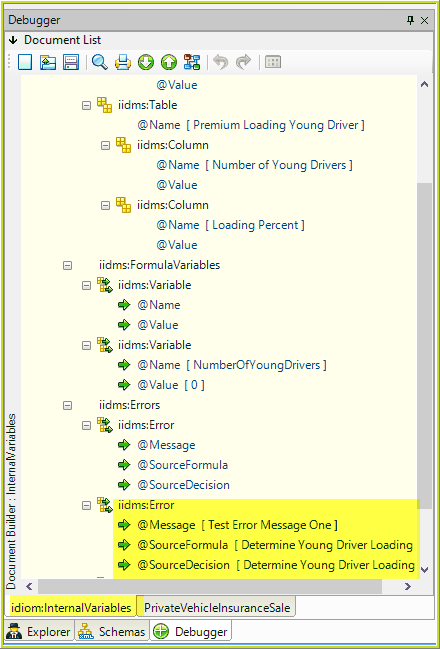
4-71(c) The specified error message is displayed in the internal schema.