Boolean (true/false) Hover Tab |
  
|
Boolean (true/false) Hover Tab |
|
Boolean (true/false) Hover Tab
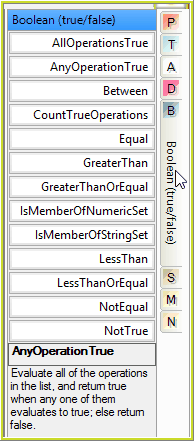
AllOperationsTrue |
Evaluate all of the operations in the list, and return true if they all evaluate to true; else return false. |
AnyOperationTrue |
Evaluate all of the operations in the list, and return true when any one of them evaluates to true; else return false. |
Between |
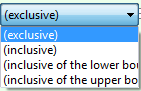
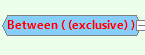
Returns true if the test value is greater than the lower boundary and less than the upper boundary. Note, if upper boundary is less than the lower boundary, this operation can never return true. Double-click on 'Between' to select the comparison mode:
|
CountTrueOperations |
Evaluate all of the operations in the list, and count the true responses. |
Equal |
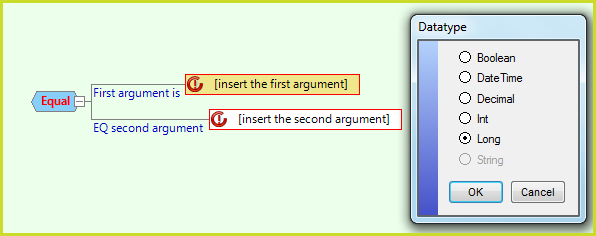
Returns true when the first argument is equal to the second argument. Otherwise, it returns false. Double-click on '[insert the first argument]' to select the Data type for the comparison. Use 'StringCompare' on the S hover tab for the String data type.
|
GreaterThan |
Returns true when the first argument is greater than the second argument. When the Data type is 'DateTime', it returns true when the first argument is later than the second argument. Otherwise, it returns false. Double-click on '[insert the first argument]' to select the Date type as shown above. |
GreaterThanOrEqual |
Returns true when the first argument is greater than or equal to the second argument. When the Data type is 'DateTime', it returns true when the first argument is later than or the same as the second argument. Otherwise, it returns false. Double-click on '[insert the first argument]' to select the Date type as shown above. |
IsMemberOfNumericSet |
Evaluate all of the operations in the list, return true when the supplied numeric value is matched by one or more of the operations in the list. Double-click on '[insert the first argument]' to select the Date type as shown above. Only Decimal, Integer and Long sets are supported. |
LessThan |
Returns true when the first argument is less than the second argument. When the Data type is 'DateTime', it returns true when the first argument is earlier than the second argument. Otherwise, it returns false. Double-click on '[insert the first argument]' to select the Date type as shown above. |
LessThanOrEqual |
Returns true when the first argument is less than or equal to the second argument. When the Data type is 'DateTime', it returns true when the first argument is earlier than or the same as the second argument. Otherwise, it returns false. Double-click on '[insert the first argument]' to select the Date type as shown above. |
NotEqual |
Returns true when the first argument is different to the second argument. Otherwise, it returns false. Double-click on '[insert the first argument]' to select the Data type for the comparison as shown above. Use 'StringCompare' on the S hover tab with 'NotTrue' below for the String data type. |
NotTrue |
Tests the boolean argument and returns the opposite value (true becomes false and false becomes true). |
Table 8-5: Operators available from the Boolean (true/false) Hover Tab
 ->