Position To Node |
  
|
Position To Node |
|
PositionToNode is used in association with the Locate Node operator. It allows you to address a specific node within a list using its index value (i.e. the numerical value representing the node's position in the list). You can supply the index value directly as an integer, or you can use the Locate Node operator to find a node and return its index for you. Locate Node will evaluate all nodes in the collection and return the index of the first node that meets the criteria.
In order to step through a collection you can use the Index operator to retrieve the Index value of the current node and add 1 to it to position to the next adjacent node in the collection. Provided that the nodes have been sorted in the correct order, this allows you to process and ordered list.
When you are comparing nodes in the same collection you will usually need to skip either the first or last node in the collection because it will have no prior or next node respectively. You can use the FirstNode and LastNode operators to identify these nodes and the Skip operator to bypass processing of them.
One use for this operator is to process multiple instances of the same list within the same operation. For example, when we want to validate the interval between instances in a list.
Figure 4-39 shows an extract from the Calculate intervals between items formula in the Health Claim Processing repository. The section labelled 'calculate the date interval' goes through all claim dates to verify that no interval between any two dates is greater than 5 days. See the Health Claim Processing repository for a full view of the formula.
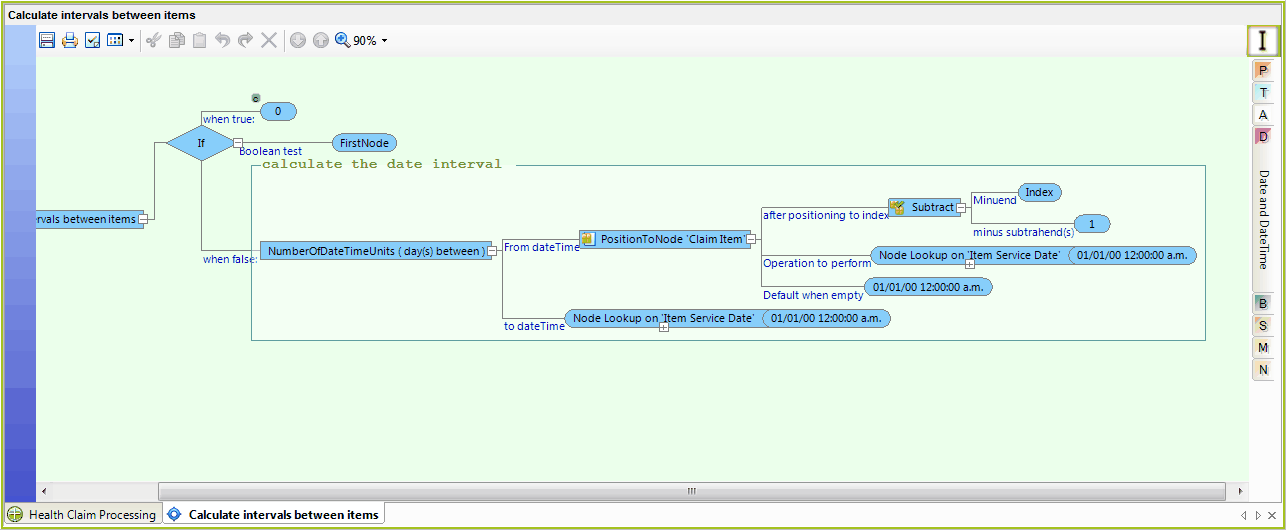
Figure 4-39: Extract from the `Calculate intervals between items' formula
Several operators are required to execute this formula:
Operator |
Function |
FirstNode |
Ensures that we do not process the first claimItem in the list since it does not have any preceding claimItem and therefore no interval. FirstNode is used because we are indexing backwards. We could also use LastNode if we were indexing forward |
Index |
Used to directly address the node. In this example, the formula context is naturally iterating over the list of claim items because the repeating node Claim Item is the context node for the formula. 'Index' will return the index value of the current item being processed. Therefore Index-1 can be used to address the previous item as is shown in Figure 4-49. Because we can index the current and previous items, we can calculate the interval value and make the comparison required by our formula. |
Table 4-6: Function of operators used in the Calculate intervals between items formula