Detaching Decisions from Decision Groups |
  
|
Detaching Decisions from Decision Groups |
|
In this example, we will show you how to detach a decision from a decision group in the Validate and Price Private Vehicle Insurance decision model.
A decision can be detached from a group if you wish to make it a stand-alone decision (i.e. a root in the tree).
STEPS
1. |
Right-click on the decision that you wish to detach from its current decision group (e.g. Validate Start Date) and select `Detach' |
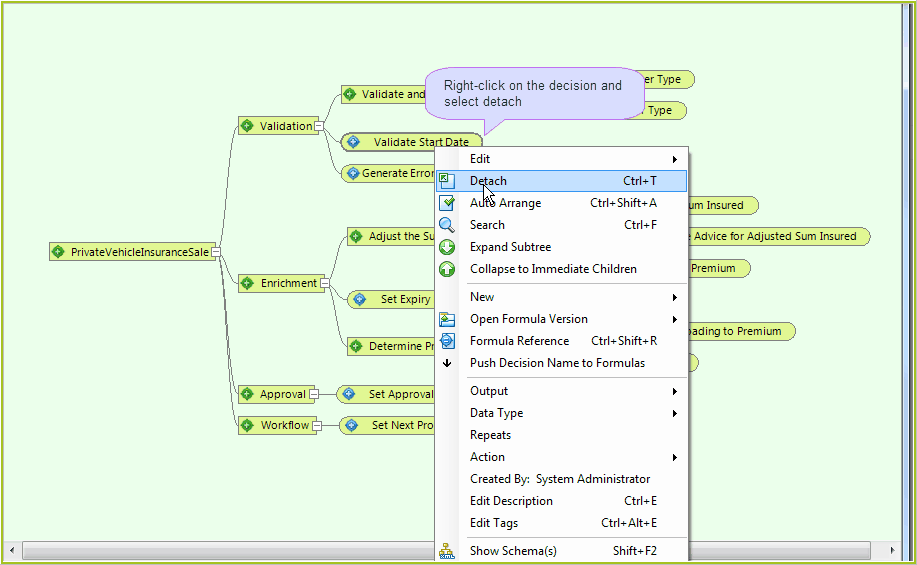
Figure 3-28: Detaching a decision from a decision group
The decision is now detached from the decision group:
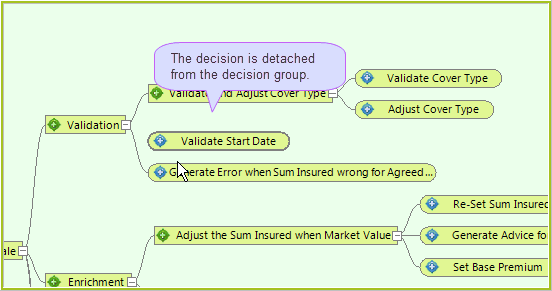
Figure 3-29: A detached decision
Tip |
If you wish to delete a decision or decision group entirely, you can do so by selecting Edit | Delete from the right-click drop-down box instead of `Detach'. |