Compare, Copy Merge Decision Model |
  
|
Compare, Copy Merge Decision Model |
|
The 'Compare, Copy Merge Decision Model' functionality gives users the ability to copy entire models or any part thereof, compare and ‘difference’ them, and selectively merge (import) branches (from the root down to a single decision, and any branch in between) of models.
This specifically allows forking of decision models, separate model development, and selective re-merging later as required. It is important to note however that if you intend to branch all, or part of a decision model as a new decision model, you must do so in a separate repository. Should you import a new decision model in to the same repository as the original, any matching formulas would not imported, and are shared between both decision models.
There are times when you may wish to utilise certain decisions and decision groups from one decision model in another decision model. Provided both decision models utilise the same source schemas, (i.e. the schemas have the same root node), you can import an entire decision model or any part thereof.
Please note that importing all or part of a decision model is an action that can make significant changes to the target decision model. These imported changes are automatically saved as a necessary part of the import process, hence there is no straightforward way to reverse an import if the user then realises they have made an error in the definition of the import, or the import produces results different to those anticipated. Therefore it is recommended that the user takes a backup of the repository prior to undertaking an import. In fact, you may consider undertaking the import on a test copy of the repository prior to undertaking the import on the live repository.
A common scenario for this feature is to bring changes made to a set of decision models in Production (e.g. a BAU - 'Business as Usual' set) through to a new set of decision models for the same business functions that are currently being developed and will eventually replace the decision models currently in production.
The essential requirement in this scenario is that existing BAU changes are not 'lost' when transitioning from the current set of models in production to the set of models under development that will be in production in the future.
Importing a new Decision Group
For the purpose of demonstrating this functionality we will import a new decision group from the 'Vehicle Insurance Demo BAU' (production) repository into the 'Vehicle Insurance Demo' (Development) repository.
The decision model in production has been modified to expand the set of decisions that are undertaken when generating a loading on the calculated premium. The changes to the decision model in the production repository are shown below.
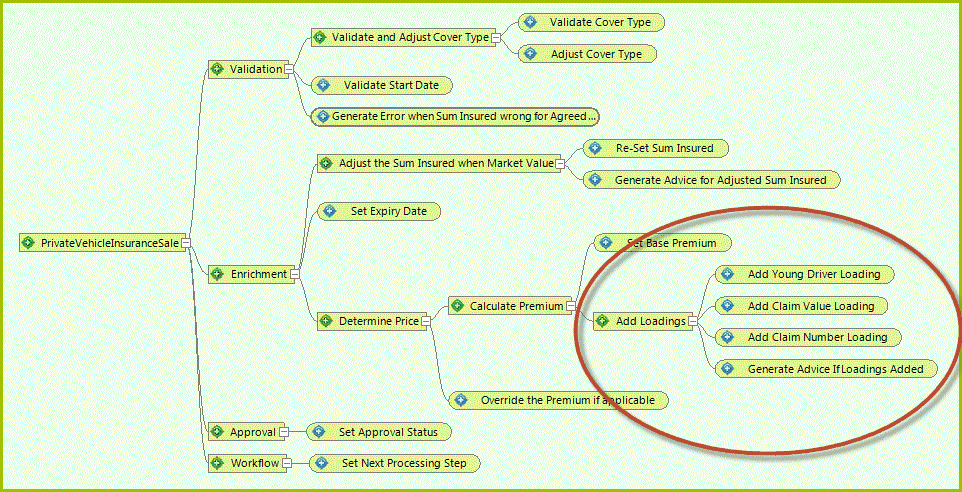
Figure 3-60 Changes in Production version of the 'Validate and Price Private Vehicle Insurance' Decision Model Decision Model
The changes in this decision model are:
•New decision group ('Add Loadings')
•New decisions and formulas ('Add Claim Value Loading', 'Add Claim Number Loading', 'Generate Advice If Loadings Added')
•Modified decision and formula ('Add Young Driver Loading' – was previously 'Add Loading To Premium')
•Modified UDO ('Error / Warning Message' – was previously 'Error Message') referenced by the new formula for the new decision 'Generate Advice If Loadings Added'
•Modified Table ('Premium Loading Young Driver' – was previously 'Young Driver Loading') referenced by the modified formula for the modified decision 'Add Young Driver Loading'
We will now show you how to Compare and then Import this set of changes.
Tip |
The Import process saves immediately, so it is recommended that the user takes a backup of the repository prior to undertaking an import. |