B. Look at the Schema |
  
|
B. Look at the Schema |
|
STEPS
1. |
Open the Billing Schema by double clicking on its name in the Explorer pane of the decision model. |
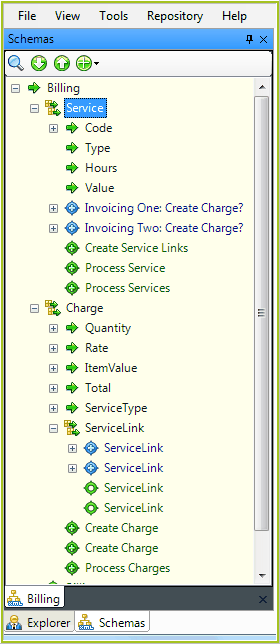
Figure 4-45: The Billing Schema
You can see that the principle nodes in the Schema are the repeating nodes Service, Charge and Service Link. We will only be focusing on Service and Charge in this exercise.
The nodes under Service include:
· |
Code |
· |
Type |
· |
Hours |
· |
Value |
The nodes under Charge include:
· |
Quantity |
· |
Rate |
· |
ItemValue |
· |
Total |
· |
Service Type |
Note how these correspond to the items Idiom Carpet Company specified they wished to record as part of their service charge processing.
In this exercise, we will be creating decisions and formulas for all of these nodes except Service Type and Service Hours.
The first step in doing this is to create the decision groups and decisions in the decision model.