External Context |
  
|
External Context |
|
External context is used when we want to process two (or more) unrelated collections in parallel. In particular, when we are reading one list and using it to create a new list. Why do we call it ‘external context’? Let’s assume that we want to process (read) list A and create a new list B. As you can see from the above discussion, context can be switched within a formula by specific operators as we navigate around the XML defined data, more specifically, as we cross the boundaries defined by multi-valued nodes (collections). In order to create a new node in our new list B, we need to produce a new output at the root of the formula, which will be inserted into the list B by a ‘create’ action on a decision or decision group. But when we do this, we don’t want to lose track of our place in list A, which is the source of the data going into list B. We need to hold the list A context (specifically, the index value of the specific node in list A that is in focus) externally to the formula, otherwise we will re-read the list A node that we have just processed. We can think of this as maintaining a ‘cursor’ in the list. We set up this ‘cursor’ by placing a decision group as a parent or higher level ancestor (if multiple external contexts are being used) of the decision that is executing our formula.
The normal behaviour of a decision group and/or decision whose context node is a collection is to iterate over the collection. In order to use external context, we will have a decision group on list A (with the normal ‘update’ action) which will allow us to read the list. This will naturally iterate over the list A collection. Beneath the list A decision group, we will have either a) a decision with an ‘Always Create’ action (this action creates a new parent element in a collection as well as an immediate child element) and/or b) a decision group with a ‘Create’ action, and child decisions, also with Create. Decisions and decision groups with create actions do not iterate.
So let’s see how this works. The list A decision group cycles over a node in list A. For each list A node it will pass control down to its child decision(s) or decision group(s) which will ultimately run a formula to create a new value, which it will place in list B after creating a list B element. Control then naturally returns to the list A decision group, which repeats for each node in the list A collection. As you can see, the formula has come and gone – it cannot retain context on list A. The list A context is ‘external’ to the formula. What the External Context operator allows us to do is to reset the current context for the formula back to list A using the current index (the cursor) of the list A decision group.
It is possible to use multiple external contexts within the same decision. Any decision group located on a collection that is an ancestor of a decision is automatically able to be referenced by an external context operator within that decision’s formula by simply dragging the collection onto the formula palette and clicking on ‘ExternalContext’ operator. If the collection is only referenced by one decision group, you only need one external context operator. However, if you stack up more than one decision group ancestor on the SAME collection, it will have two cursors available on that collection. To access the second cursor (that is, the one held by the decision group that is most distant from the decision and its formula) you need to use two external context operators in series. Simply drag and clip the second external context onto the first external context argument to step up to the extra decision group and its cursor.
For the sake of clarity, even though we have built a parent/child relationship between the decision groups and decisions processing list A and list B respectively, list A and list B themselves do NOT need to be related as data elements – they do not even need to be defined in the same schema.
We will explain how to use this operator using the Idiom Carpet Company sample repository (C:/Program files\Idiom Software\IDIOM Decision Manager v4.5\Sample repositories/Idiom Carpet Company.idm - see Importing a repository for information on how to import this completed schema into your repository)
In this case study, the company wishes to create a model that will allow it to keep track of records of service charges relating to its carpeting business. The company needs to record the following items whenever any of its staff members provide a service:
· |
Service Type |
· |
Quantity |
· |
Rate |
· |
Item Value |
· |
Total |
The service charges for each type of service are set by management and will be included in an IDIOM table as shown in Figure 4-43.
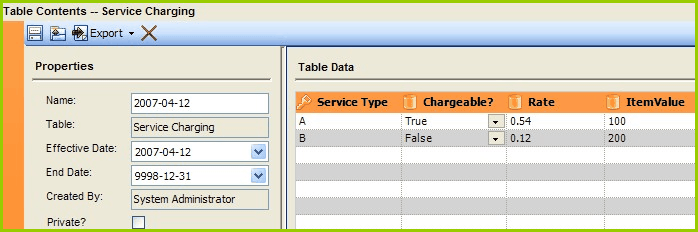
Figure 4-43: Service Charging Table for Idiom Carpet Company
We will now create this processing model in IDIOM. We will assume that the required schemas, decision models and tables have already been created but we will have to create the decision groups, decisions and formulas.
The sections below guide you through the following steps:
A. Open the Idiom Carpet Company Repository
B. Look at the Schema
C. Create the decision groups and decisions in the Invoicing One decision model
D. Create the formulas associated with the decisions in the Invoicing One decision model
E. Test the decision model