Viewing Existing Table Contents |
  
|
Viewing Existing Table Contents |
|
This function can be useful for verifying the table definitions and specific data that formulas will reference and return when undertaking table look ups.
A Formula Expert can view:
•the Table Definitions created by the System or Workgroup Administrator
•the contents of any set of Table Contents created by any member of their workgroup (even if checked as ‘Private’)
•the contents of any set of Table contents that have not been checked as ‘Private’ (regardless of who created the set).
To view the default Table contents for the Base Rate table in the Vehicle Insurance repository:
STEPS
1. |
Double click on the Base Rate for Private Cover Type table > Table Definition pane (You can also right-click on the table and select Open) |
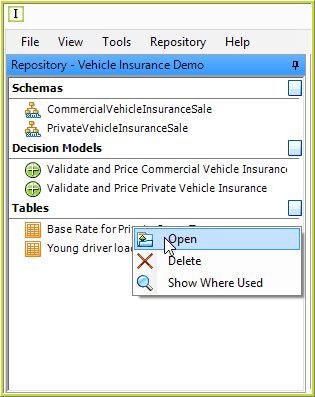
Figure 5-1: Opening the Table definition pane
The Table Definition pane opens:
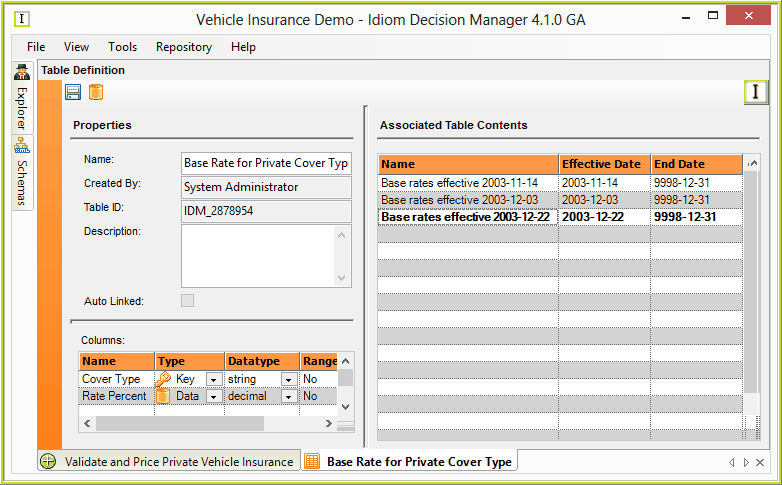
Figure 5-2: The Table Definition pane
2. |
Double click on an associated Table Content in the 'Associated Table Contents' pane (e.g. Base Rates Effective 2003-12-22). |
3. |
If your permission settings allow you to view the table contents then the Table contents pane will open and display the contents of the table that you selected. |
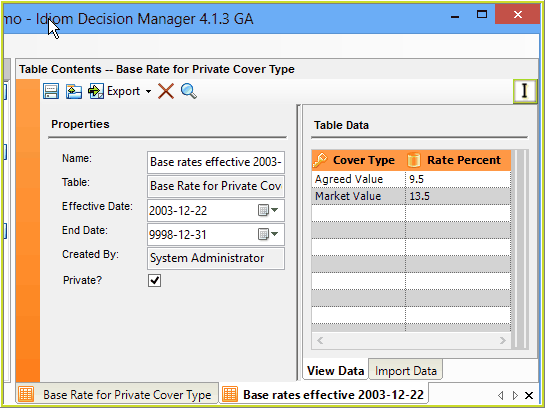
Figure 5-3:The Table contents pane.
Tips |
You can re-sort the table data - simply click on the header of any column to sort by that column (ascending or descending). You can search the table data by clicking on the Search Icon |
•You can re-sort the table data - simply click on the header of any column to sort by that column (ascending or descending).
