To view all of the areas in the repository where an existing entity (e.g. formula, decision, table etc) is used, right-click on the entity and select 'Show Where Used':
STEPS
1. |
In the Vehicle Insurance repository, double click on the PrivateVehicleInsuranceSale schema > customized Schema pane |
2. |
Right-click on any entity, e.g. Set Base PremiumV2 and select 'Show Where Used' > Where Used window, or alternatively you can use the shortcut key ('Ctrl + Shift + W'). |
3. |
The Where Used window is displayed in a Grid format. |
Click on the Toggle display button to toggle between the Grid and the Graph display.
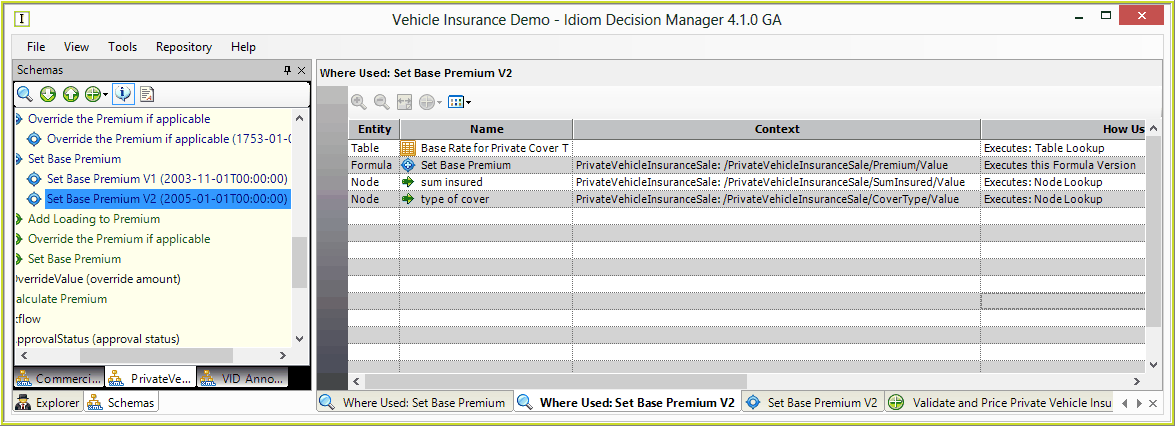
Figure 2-6(a): An example of a Where Used window (Grid view)
Double-click on any entry to open the selected entity. Right-click on any entity and select
▪Open - to open the selected entity (formula/formula version/decision/table)
▪Open related Item - to view and select from a list of items related to the selected entity (e.g. formula | formula versions). NOTE: This option is not available if there are no related items.
▪Find in schema - Will open the schema (if not already open) and highlight the selected entity.
NOTE: You can also open the Where Used window by right-clicking on a decision/decision group in a decision model and selecting 'Show Where Used'.


