Show where used graph view |
  
|
Show where used graph view |
|
1. |
Different elements, e.g. Decisions/formula's/tables, are represented by different shapes and colours. |
Item |
Graphic Representation |
Decision Group |
|
Decision |
|
Formula |
|
Formula Version |
|
Node |
|
Table Definition |
|
UDOs |
|
Table 4-1: Items in the Where Used window
2. |
Click on the Toggle Display button |
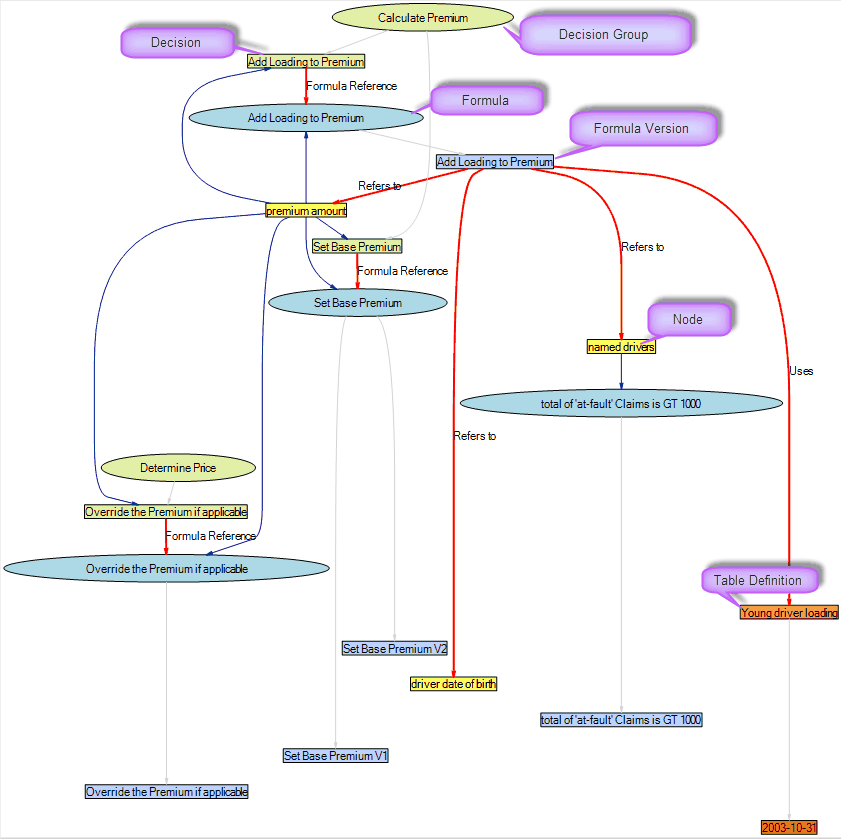
Figure 2-6(b): An example of a Where Used window (Graph view)
▪Zoom in closer to any item in the window by clicking on the Zoom In icon  ;
▪Zoom out by clicking on the Zoom Out icon  . You can also use the scroll wheel on your mouse.
▪Click on the Fit to Screen Width icon  to fit the image to suit your screen width.
3. |
Click on the Filter icon |
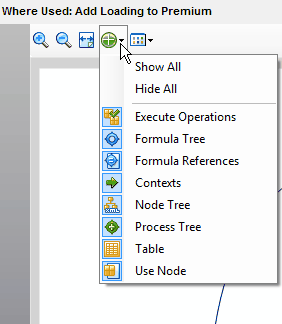
Figure 2-6(c): Filter Button in Where Used window (Graph view)
Filter Item |
Graphic Representation and Description |
All |
All items are shown in the Show Where Used window |
None |
No relationships between items are displayed in the Show Where Used window |
Execute Operations |
Execute operations are shown in the Show Where Used window i.e. any item that executes another item using an ExecuteDecision, ExecuteFormula or ExecuteUDO operation is shown linked to that item. |
Formula Tree |
The Formula Tree option displays the connections between formulas and formula versions. In the image below the Add Loading to Premium formula is shown to be linked to the Add Loading to Premium formula version. |
Formula References |
Formula references display connections between formulas and decisions |
Context |
Context displays the relationships between decisions or decision groups, formulas, formula versions and UDOs and the schema nodes that they are associated with. A UDO can have more than one context depending on where it is executing. (Note: You can see the context of the different `error' nodes by holding your mouse over the node and looking at the tool-tip. This will help distinguish between nodes that have similar or identical names) |
Node Tree |
The Node Tree displays the relationships between the nodes on the customized schema and any child nodes that belong to it |
Process Tree |
The Process Tree displays relationships between the decision model and the decision groups it contains or between the decision groups and the decisions that make up the group. |
Table |
Displays the relationships between formulas and UDOs that reference table data using the ExistInTable, TableLookup and TableRange operations and the tables that they refer to. The linkages between the Table definitions and the Table contents that these refer to are also shown. |
Use Node |
Formula versions or UDOs that refer to a particular node are shown in relation to that node. |
Table 2-5: Items in the Where Used window filter
4. |
Right-click on any item in the Where Used window to see more details about it. |
▪If you right-click on an item and select Open, the item will open in IDIOM. For example, if you right-click on the blue `Adjust cover type' rectangle, the `Adjust cover type' formula will open.
▪If you right-click on the item and select Show Where Used, a new Show Where Used window opens. This window shows all the connections between the item you originally selected and other items in the decision model.
▪If you right-click on the item and select Expand, the current Show Where Used window will be expanded to include other items linked to the item you selected in the decision model. For example, if you click on a decision group and select expand, all of the decisions in that group will now be displayed in the window.






 to toggle between the Grid and the Graph display. The Where Used window is displayed in a Graphical format:
 and select from the following options to filter the items to be displayed in the Graph View: