Process Control Hover Tab |
  
|
Process Control Hover Tab |
|
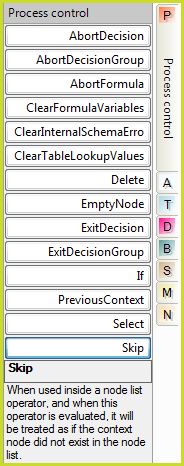
Process Control Hover Tab
AbortDecision |
May be executed by any formula. All formulas in the decision stack will terminate, and the decision node will be left as it was before THIS decision execution started. |
AbortDecisionGroup |
Stop executing the decisions in this group AND roll back the results of any decisions already executed within the group. |
AbortFormula |
May be executed by any formula. Only that formula will be terminated. Any calling formula will then use the default 'if null' value. |
ClearFormulaVariables |
Clears the internal variables schema of all previously recorded formula variables. See Formulas Using Internal Schema |
ClearInternalSchemaError |
Clears the internal variables schema of all previously recorded errors. See Formulas Using Internal Schema |
ClearTableLookupValues |
Clears the internal variables schema of all previously recorded table lookup values. See Formulas Using Internal Schema |
Delete |
Delete the decision context node and all of its descendents. Note that the node must be a decision output node (marked with a green icon ) before it can be deleted. |
EmptyNode |
If this is placed on an argument, only the output node xml tags will be created. There will be no value between the tags. |
ExitDecisionGroup |
Stop executing the decisions in this group, including this one. Values from decisions already processed are retained. |
If |
Evaluate the condition, and return the `Then' value if true; or the `Else' value if false. For nested IF statements, we suggest using formula labels for clarification. |
PreviousContext |
Shift the context to the immediate previous context node. Only NodeList operations shift context node, so this operation is only valid within a NodeList operation. When used within the NodeList operation, this operation will switch the context to the DIRECT PREDECESSOR of the node list operation in question, then evaluate the argument. It is possible to nest this operation only when the context is within nested node list operations. This operation can be regarded as a context stack `Pop', where all other node list operations are Context stack `Push'. |
Select |
Used to execute one of multiple possible cases. Each case is evaluated against the `MatchCase' and the first matching case is then executed. |
Skip |
When used inside a node list operator, and when this operator is evaluated, it will be treated as if the context node did not exist in the node list. |
Table 8-4: Operators available from the Process Control Hover Tab