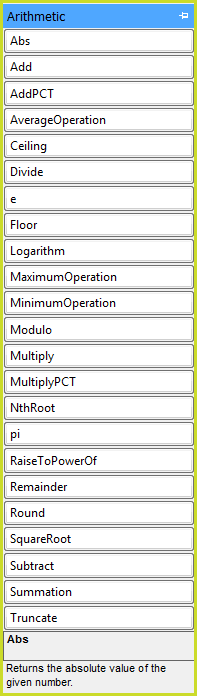
Abs
|
Returns the absolute value of a specified int/long/decimal value.
|
Add
|
Add the results of all of the operations listed.
|
AddPCT
|
Determine the nominated percentage of the supplied value and then add it to the supplied value. For example, Add ‘10’ percent to 50 is 55.
|
AverageOperation
|
Evaluate all of the operations in the list and return the average value (sum the total and divide by the number of operations).
|
Ceiling
|
Returns the smallest integral value that is greater than or equal to the specified decimal (rounding towards positive infinity).
|
Divide
|
Performs division operation on the Dividend and Divisor arguments. When the Divisor is zero, then the third argument will be returned. When both the Dividend and Divisor are integers, then integer division is performed e.g. 6 divided by 4 will yield 1 as opposed to 2. It has two modes – 'DecimalQuotient' and 'IntegerQuotient'. DecimalQuotient is the default mode and first converts all values into decimal values. IntegerQuotient returns integer values, without remainders
|
e
|
The base of natural logarithms
|
Floor
|
Returns the largest integral value less than or equal to the specified decimal (rounding towards negative infinity).
|
Logarithm
|
Calculates the logarithm of a number using the given base number (both numbers can be decimals)
|
MaximumOperation
|
Evaluate all of the operations in the list and return the largest value found.
|
MinimumOperation
|
Evaluate all of the operations in the list and return the smallest value found.
|
Modulo
|
Performs modulo operation on the Dividend and the Divisor arguments and returns the result. When the divisor is zero, the third argument will be returned.
|
Multiply
|
Compound multiply the results of all of the operations listed.
|
MultiplyPCT
|
Determine the nominated percentage of the supplied value. For example, 10 percent of 50 is 5.
|
NthRoot
|
Calculates the n-th root of a number.
|
Pi
|
The ratio of a circle's circumference to its radius
|
RaiseToPowerOf
|
Calculate the power of the base number. Note, both arguments are allowed to be decimal numbers.
|
Remainder
|
Performs division operation on the Dividend and Divisor and returns the remainder. When the Divisor is zero, the third argument will be returned.
|
Round
|
Adjust the target value to the nearest multiple of the precision value. The following modes are available:
- To the nearest – round by half-adjusting. Add half of the precision value and if the next multiple of the precision value is reached or exceeded, then round up; otherwise, round down. This is the default.
· Up to the next - rounds up to the nearest specified precision
· Down to the next - rounds down to the nearest specified precision
|
SquareRoot
|
Calculates the square root of a number.
|
Subtract
|
Subtract all subtrahends from the minuend.
|
Summation
|
Evaluate the summation of the expression, from some minimum to some maximum.
|
Truncate
|
Drops any fractional portion of the specified decimal without performing any rounding.
|