Populate the Control Decision Model |
  
|
Populate the Control Decision Model |
|
Once you have created your Control decision model and separate specialist decision models, you then need to populate the control model with the decisions and formulas that will determine when these new specialist decision models will be invoked. For this example we will use the Control decision model ‘Vehicle insurance Control Model’ and the new 'specialist' decision models we have just created in the previous topics.
STEPS
1. |
Open the ‘Vehicle Insurance Control’ repository and open the ‘Vehicle Insurance Control Model' control decision model |
2. |
Add a ‘Model Control’ decision group – with the context set to the root node of the Transaction Control schema (icdms:TransactionControl) |
3. |
From the new ‘Model Control’ decision group: •Add a new decision ‘Set Repository Name’, with the context set to ‘@RepositoryName’ under ‘icdms:NextDecisionModel’ in the transaction control schema •Add a new decision ‘Reset Decision Model Name’, with the context set to ‘@DecisionModelName’ under 'icdms:NextDecisionModel' in the transaction control schema •Add a new decision group ‘Decision Models’, with the context set to ‘icdms:NextDecisionModel’ in the transaction control schema |
4. |
From the new ‘Decision Models’ decision group add the following new decisions (all with the context set to ‘icdms:NextDecisionModel’: •‘Determine If Next Model Is Validate and Price’ •‘Determine If Next Model Is Young Driver Loading’ •‘Determine If Next Model Is Claim Loading’ •‘Determine If Next Model Is Status’ |
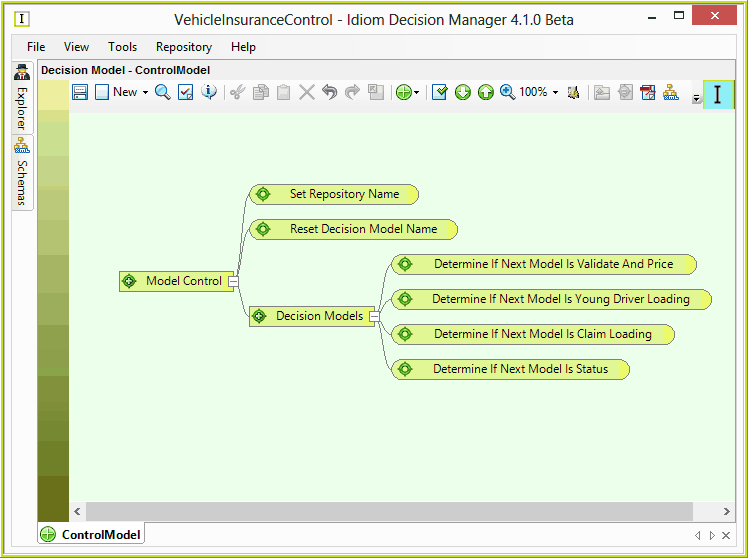
Figure 3-100(a): Populating the Control Model
5. |
Add a formula to the new ‘Set Repository Name’ decision to set the repository name to be referenced when a decision model is to be invoked by the control model. The repository name must be the name of the repository defined for each of the ‘specialist’ decision models when they were created – as defined in the ‘Fully Qualified Class Name’ field on the properties page for the decision model. In this example it is ‘VehicleInsuranceControl’ |
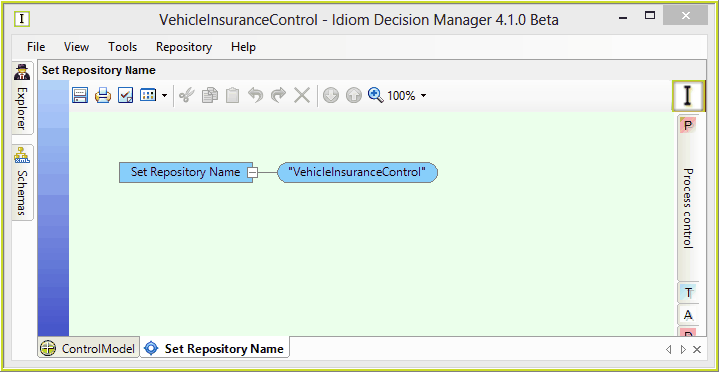
Figure 3-100(b): Where to find the decision model 'Repository Name'
6. |
Add a formula to the new ‘Reset Decision Model Name’ decision to set the next decision model name to be empty (e.g. “”), to force the subsequent decisions of this iteration of the control model to populate it, rather than have it carry through from the previous iteration of the control model. |
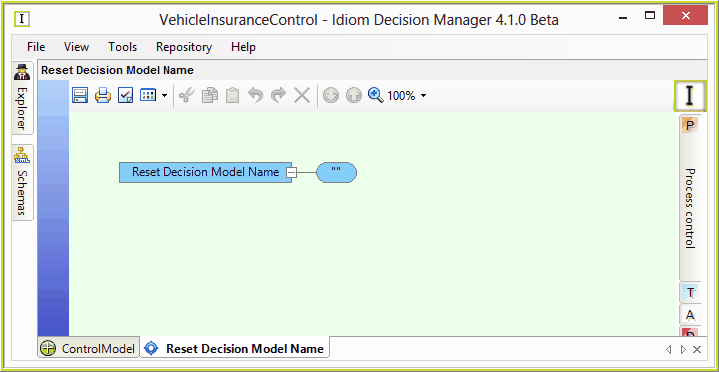
Figure 3-100(c): Reset the Decision Model Name
7. |
Add a formula to the new ‘Determine If Next Model Is Validate And Price’ decision to determine if the ‘Validate And Price Private Vehicle Insurance’ ‘specialist’ decision model needs to be executed next. This formula: •Tests if a model has already been determined for this iteration (aborts the decision if a model has already been determined) •Tests if the “ValidateandPricePrivateVehicleInsurance’ model has already been executed (aborts the decision if it has) •Sets the next decision model as ‘ValidateandPricePrivateVehicleInsurance’ |
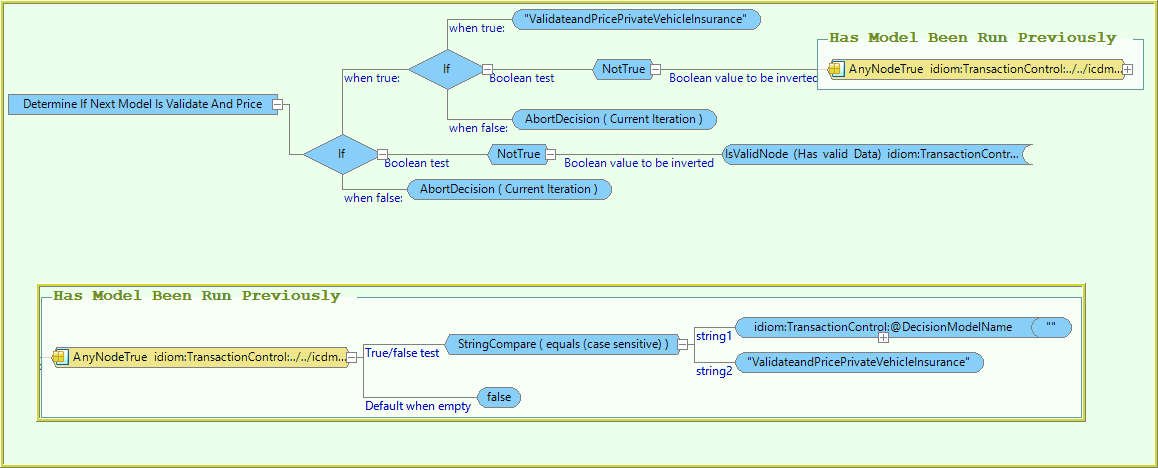
Figure 100-(d): ‘Determine If Next Model Is Validate And Price’ Formula.
8. |
Add a formula to the new ‘Determine If Next Model Is Young Driver Loading’ decision to determine if the ‘Young Driver Loading’ ‘specialist’ decision model needs to be executed next. This formula: •Tests if a model has already been determined for this iteration (aborts the decision if a model has already been determined) •Tests if the “YoungDriverLoading’ model has already been executed (aborts the decision if it has) •Tests if there are any drivers under the age of 25 •Sets the next decision model as ‘YoungDriverLoading’ |
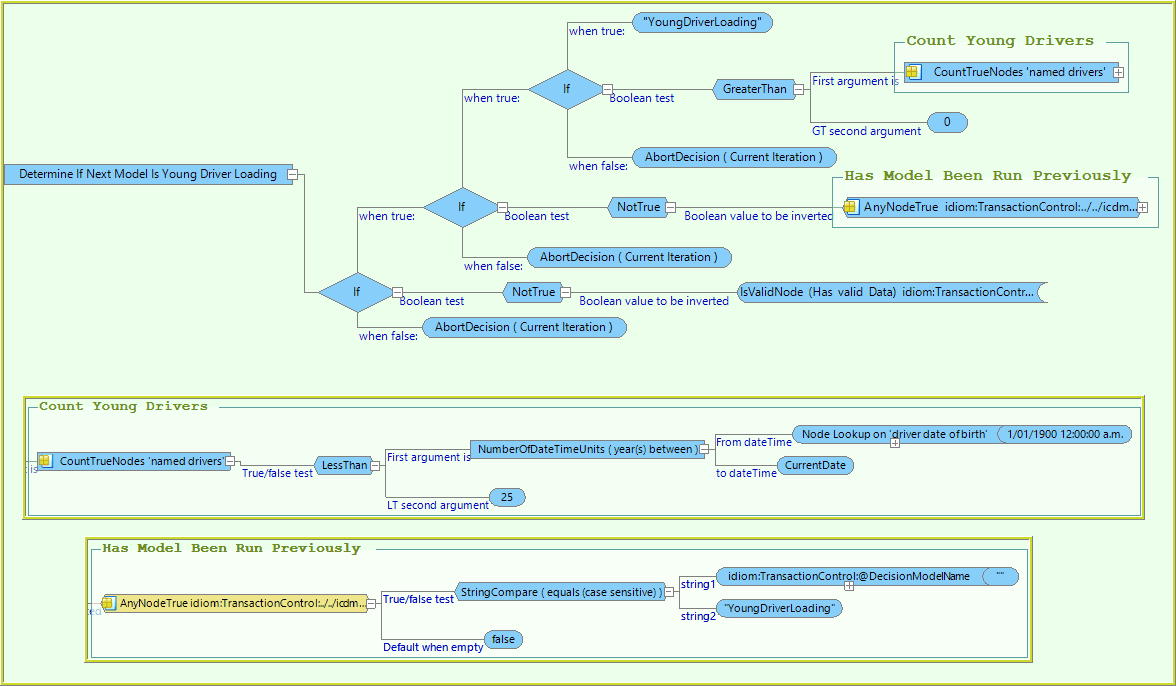
Figure 3-100(e): Determine If Next Model Is Young Driver Loading’ formula.
9. |
Add a formula to the new ‘Determine If Next Model Is Claim Loading’ decision to determine if the ‘Claim Loading’ ‘specialist’ decision model needs to be executed next. This formula: •Tests if a model has already been determined for this iteration (aborts the decision if a model has already been determined) •Tests if the “ClaimLoading’ model has already been executed (aborts the decision if it has) •Tests if there are any claims lodged against the drivers on the application •Sets the next decision model as ‘ClaimLoading’ |
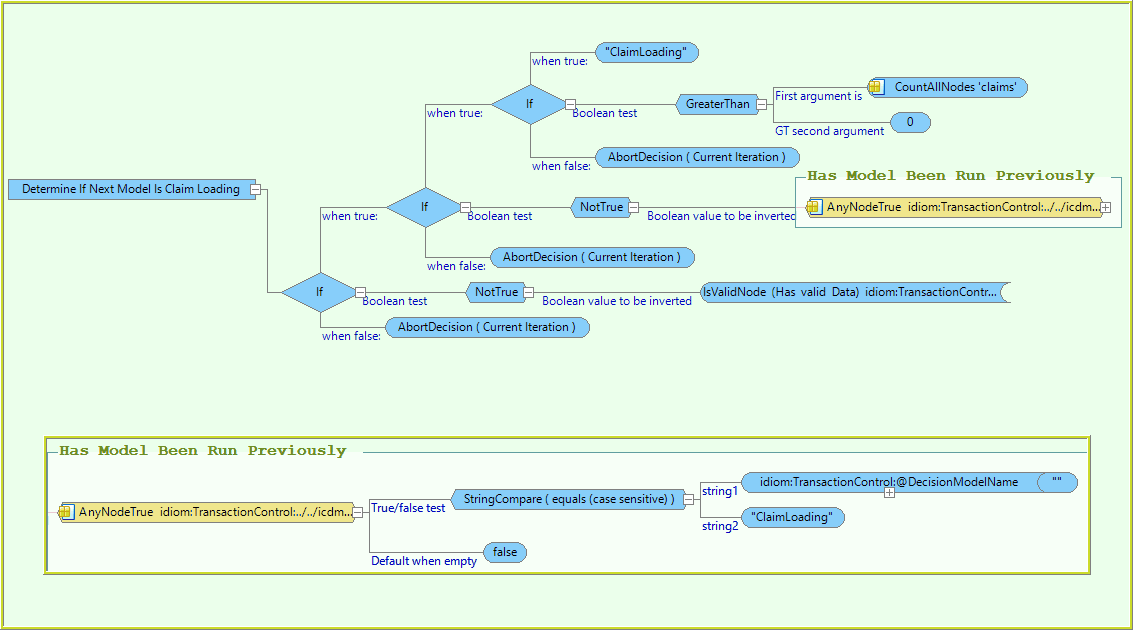
Figure 3-100(f): Determine If Next Model Is Claim Loading’ Formula
10. |
Add a formula to the new ‘Determine If Next Model Is Status’ decision to determine if the ‘Status’ ‘specialist’ decision model needs to be executed next. This formula: •Tests if a model has already been determined for this iteration (aborts the decision if a model has already been determined) •Tests if the ‘Status’ model has already been executed (aborts the decision if it has) •Sets the next decision model as ‘Status’ |
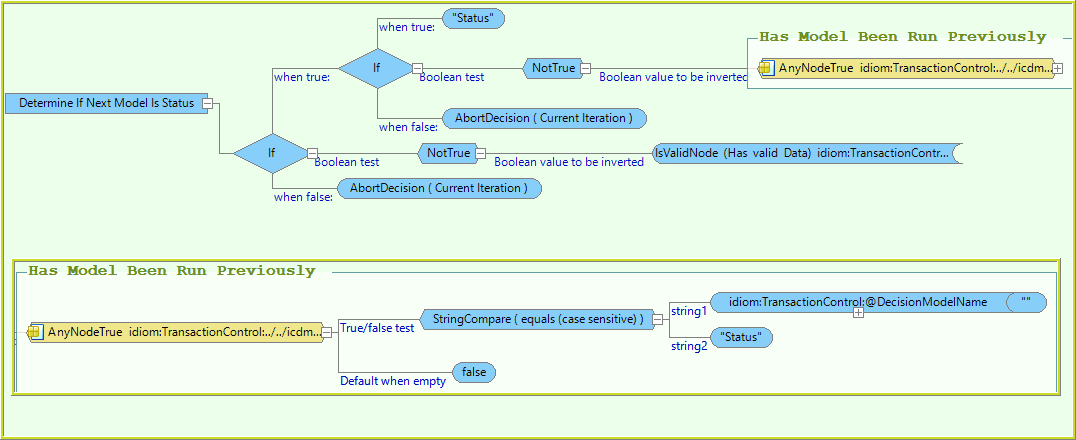
Figure 3-100(g): The ‘Determine If Next Model Is Status’ formula.
11. |
Save the new formulas and the Control decision model. |
The control decision model palette “Vehicle Insurance Control Model” should now appear as below.
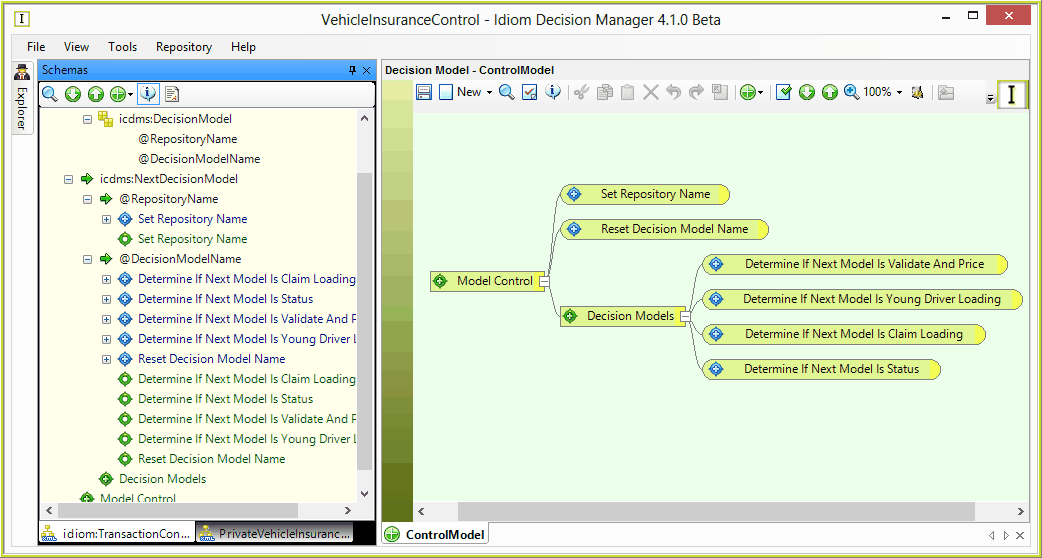
Figure 3-100(h): Completed control model and associated specialist models
The changes have now been completed to enable the ‘Vehicle Insurance Control Model’ decision model as a control decision model that conditionally invokes each of the specialist decision models for standard application checks, young driver loadings, previous claims loadings, and setting the status of the application. This control model will terminate execution when there is no longer any further ‘specialist’ models that need to be executed. This condition will arise when the ‘@DecisionModelName’ remains empty for the duration of an iteration of the control model (a control model terminates when there is no value set for ‘@DecisionModelName’ at the end of an iteration).
This updated model can be tested up to a point with the inline-tester / test executive. A sample input document can be processed and the setting of the next specialist decision models can be seen, along with the creation of the collections of previous decision models. Each run through the in-line tester represents one iteration of the control model.
However the specialist decision models will not be executed in this mode, as the 'control' feature of the control decision model is only active in an environment where the compiled Dlls for the control model and the standard models are invoked via the Decision Server API. Such environments require an application framework, or the Decision Manager Workbench (DMW).