More About Context |
  
|
More About Context |
|
Context is an important concept in the IDIOM Decision Manager.
The ‘context’ in IDIOM is set by the location of a specific node within a schema – that is, the fully qualified location of a node, including its index (i.e. its sequence if in a collection). Decision and formula operations use the location of their context nodes as a critical reference point.
•For Decision Groups, context defines the target of its ‘action’ (usually create or update), and maintains a cursor for use with the ExternalContext operation.
•For Decisions, context defines the target node for its ‘action’ and for the output of its Formula.
•For Formulas, context determines the reachability of nodes that it wants to read.
When the context node is a collection then the decision group or decision that uses that context node will automatically process all nodes in the collection in order – it is said to iterate over the collection. The index (sequence number) identifies which node is in focus at any point in time. Each time it moves to a new node in the collection, the context moves to that node and all other nodes in the collection are unreachable.
In general, equivalent context can be mixed. So a Formula on one context can be placed under a Decision with a different context PROVIDED THAT the contexts are equivalent. Equivalence means that both contexts have exactly equal reachability – in other words, they can traverse to exactly the same set of single valued nodes. Reachability is defined by what can be referenced with integrity. The 'reachable' boundary is reached when a multi-valued node is encountered. Any single valued node (with respect to the context) can be reached, even if it is in a different schema document. Note that a parent node that is part of a collection is always reachable. But it is not possible to ‘reach’ into a collection and retrieve a single value without the aid of specific operators that understand collections.
It is common for a Formula to need to reach into collections. This can normally be accomplished with the range of node operators (to be discussed in this section) that are provided for this purpose. These operators are usually accessed by simply dragging the multi-valued node onto the formula palette from the schema tree. When these operators have been clicked into place in a formula, the node list operator root adopts the current context. But the operator itself shifts the context so that any of its arguments (and operators attached to those arguments) belong to the new context set by the node list operator. The definition of this context includes the index of the node that the node list operator has in focus WITHIN the collection. Remember that the node list operator will process all nodes in the collection automatically, and each one will become a new context node in turn.
Tip |
When using these node operators you can directly access multi-valued children of multi-valued nodes – you do not need to ‘walk the tree’ (i.e. you can go straight to the lowest level collection that is required and ignore intervening collections – these intervening nodes will all be seen as ’single valued’ after Context has been moved to an element in the targeted low level collection). |
When using the node list operators, the context tree is maintained. To the left of (’above’) the node operator lies the ‘previous context’; to its right (‘below’) is the current context. You can directly access the previous context nodes using the PreviousContext operator. If you have nested collections, then you can step back through them by nesting multiple ‘Previous Context’ operators in succession, each one stepping back one context.
Tip |
As you move around the formula, operations that are sitting in another context are ‘greyed out’ – crossing a context boundary causes a change in colour of the operators. |
The following example shows a context shift across the ‘PositionToNode’ operator; and again across the LocateNode operator. If our cursor is position on the highlighted ‘If’ we can see that all greyed out nodes are in the previous context. The PreviousContext operator moves context back again so that operators to the right of PreviousContext are also greyed out.
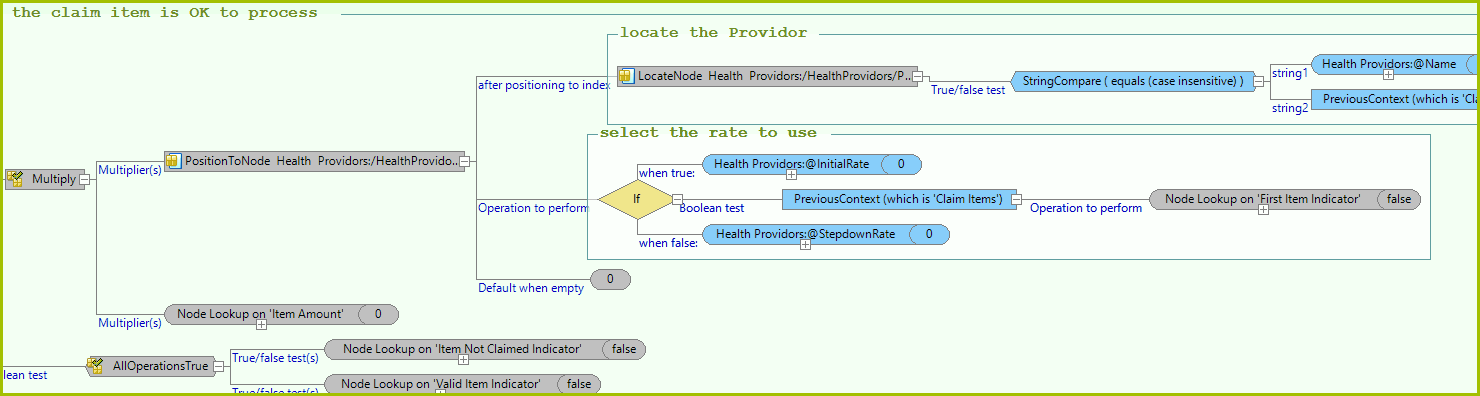
Figure 4-30(b) Operations that are sitting in another context are ‘greyed out.
Sometimes this is not enough. If you want to compare 2 lists, then you need 2 cursors at the same time - one for each list. Additional cursors can be obtained by using a feature called ‘External Context’. The context for the External Context operator is identified by using decision groups within the decision model.
To identify this context, place a decision group on each collection that you want to use as an External Context. The natural behaviour of the decision group is to iterate over each node in the collection. Each time it does this it maintains position on the node that is currently in focus. This node can be accessed and becomes the current context when using the External Context operator.
You can also nest multiple decision groups in order to maintain contexts in as many collections as required (although this is rarely required). These decision groups should be nested in the order you want to process them in, because each will iterate its collection within its parent decision group collection. Each decision group ancestor of a decision represents an available cursor. This cursor is accessed by using the ExternalContext operator. Any child operations of the ExternalContext operator have context on that decision group’s cursor – that is, the element that it currently has in focus.