Literal operations management |
  
|
Literal operations management |
|
The Literal Operations Management feature helps users manage Literal Values that are used within a formula or a user-defined operator (UDO).
A literal is a value that is hard coded into a formula or UDO. An example of a literal is a string value that is returned from a formula for population into an error message. See the example below.
STEPS To view formulas using a particular literal value:
1. Click on Tools | Literal Operations Management.
2. Once the Literal Operations Management tab is open, right-click on a Literal Value cell of choice.
3. Select the ‘Open’ option to view a list of all formulas that are using that particular Literal Value.
4. Select a formula from the List in order to open it in the formula palette.
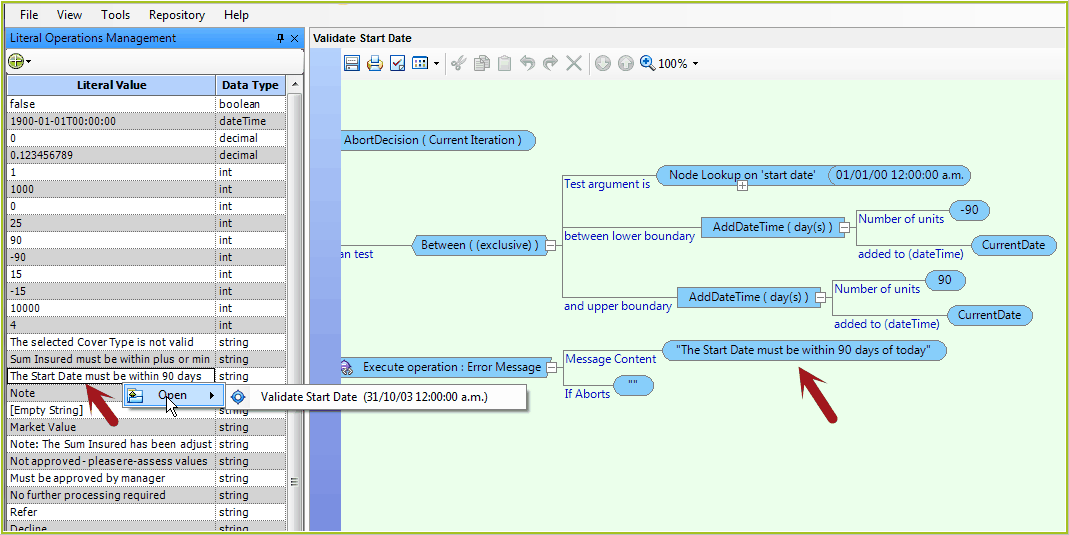
Figure 2-48 Literal values can be used in formulas and UDO's.