How to Use Node List Operators |
  
|
How to Use Node List Operators |
|
In the steps below, we explain how to use Node list operators using the AddNodes operator as an example. We will use the Total of `at-fault' Claims is GT 1000 formula from the Vehicle Insurance repository, but will only recreate a portion of the formula.
It is assumed that you are logged into the VehicleInsurance.idm repository as a Formula Expert and have the PrivateVehicleInsuranceSale schema open
STEPS
1. |
Open the Total of `at-fault' Claims is GT 1000 formula |
2. |
Click on AddNodes`Claims' and drag it on to the palette below the formula. |
We will recreate the formula from here on, copying the arguments as they appear in the fragment of the formula we have pasted below the original formula.
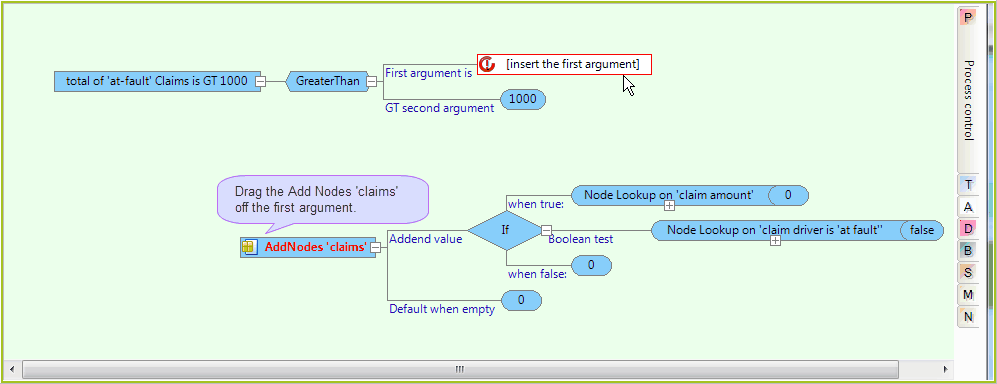
Figure 4-32: The AddNodes`Claims' portion of the formula pasted below the original
3. |
Drag the 'claims' repeating node from the customized Schema pane onto the `First argument is' answer box. |
4. |
Select `AddNodes' |
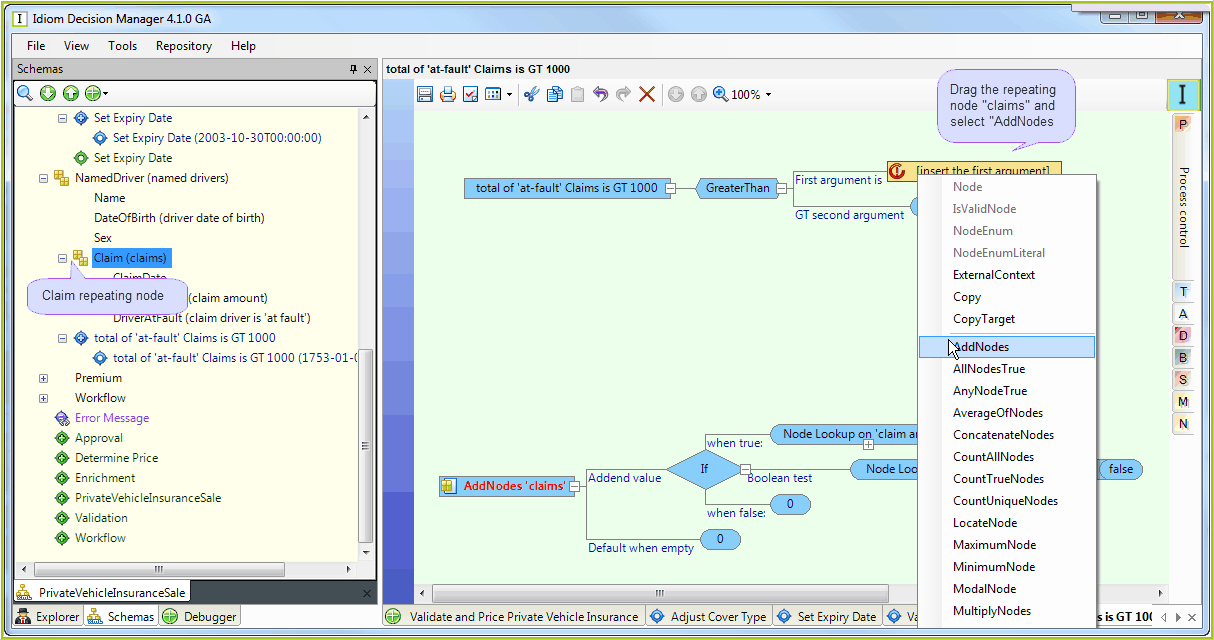
Figure 4-33: The Node list operators available for use with the Claim repeating node
5. |
Continue building the formula, copying the operators used in the portion pasted below the original. |