Assigning a User to a Workgroup |
  
|
Assigning a User to a Workgroup |
|
Both System Administrators and Workgroup Administrators can assign existing users to a workgroup. Users who have not been assigned to any workgroup can log into IDIOM, but they will not be able to open any repositories.
STEPS to assign a user to a workgroup:
1. |
Select Tools | User/Workgroup Management > User/Workgroup Management window |
2. |
Drag the name of the desired user in the Users section of the User/Workgroup Management window across to the desired workgroup in the Workgroups section of the window |
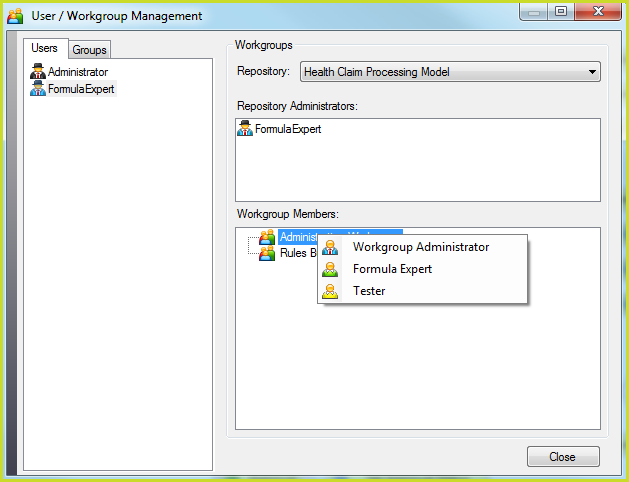
Figure 6-34(a): Assigning a new user to a workgroup by dragging their name across to the appropriate workgroup
3. |
Select the user function within the workgroup e.g. Workgroup Administrator or Formula Expert. |
The user's name now appears under the selected workgroup
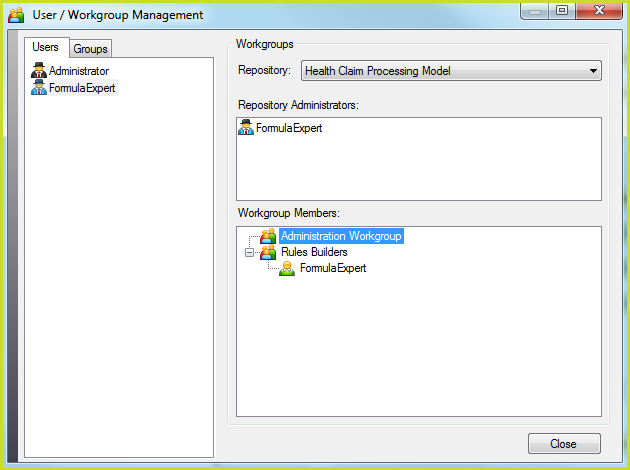
Figure 6-34(b): User name appears under the selected workgroup
Note: Close the dialog box and re-open it to refresh the screen, and display the correct 'costumes' for the various User Roles that have been assigned.
User Role |
User Role Costume |
System Administrator |
•Black Coat, Black Hat |
Repository Administrators |
•Blue Coat, Black Hat |
Workgroup Administrator |
•Blue Coat, No Hat |
Formula Expert |
•Green Coat, No Hat |
Testers |
•Yellow Coat, No Hat |
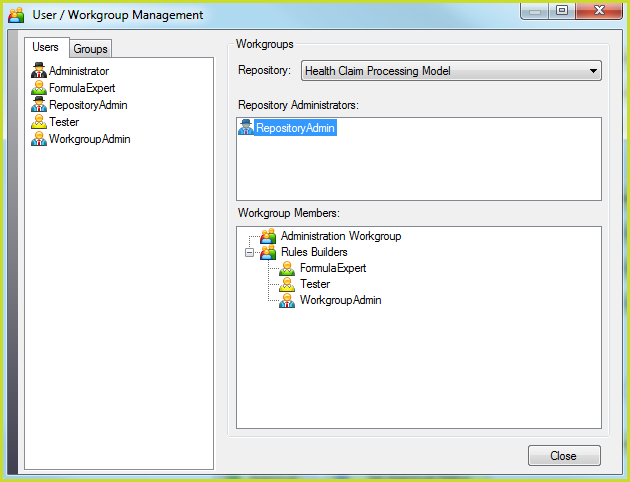
Figure 6-34(c): User Role Costumes