Using effective dates to upgrade formula versions |
  
|
Using effective dates to upgrade formula versions |
|
You can use effective dates to specify when your formula, and or formula version will come into effect. For example, in May 2003 Acme Insurance may have decided to change the premium that it charged for Private Vehicle Insurance.
The company's business rules stated that a customer who started their policy in April 2003 would still pay the old premium of $50 but a customer who started their policy in May 2003 would pay the new premium of $60.
The company can use effective dates to ensure that any future increases will be based on the particular premium that the customer is currently paying i.e. if the company decided to make a further 10% increase for customers paying the old premium and 2% for customers paying the new premium, it could use the Set Base Premium formula with the effective date of April 2003 to calculate the new premium for the first set of customers and the current Set Base Premium formula (the one with the most recent date) to calculate the new premium for the second set of customers.
In this section, we will explain how to use effective dates to upgrade the Set Base Premium formula. Note that only a member of the workgroup that created the formula or a System Administrator can version a formula by date.
STEPS
1. |
In the customized Schema pane, right-click on the formula that you wish to create a new version of. Here, Set Base Premium. |
2. |
Select `New Formula Version' > New Formula dialog box. |
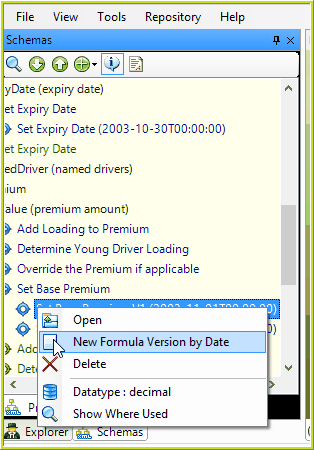
Figure 4-9: Selecting a new version of a formula.
This dialog box lets you rename your formula version to distinguish it from the original. This is also where you change the effective date of the formula version by clicking on the `Effective Date' calendar drop-down box and selecting a new effective date.
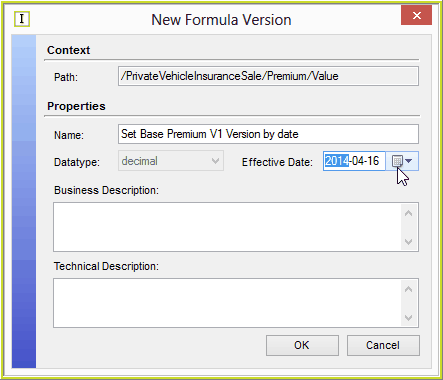
Figure 4-10: The New Formula dialog box.
When choosing effective dates, it is important to understand how IDIOM uses these dates at runtime. It follows a particular sequence:
•first it selects the Formula Reference with the most recent effective date that is before or equal to the transaction effective date and is not ended
•then it selects the Version of the formula that has the most recent effective date before or equal to the transaction effective date. Formula Versions cannot be end dated.
3. |
The new version of the formula will then appear in the formula palette. You can make any necessary changes and then click on the Save button. |
NOTE: You may be wondering why the default date is set to `1753-01-01'. This is the earliest date recognized by the .Net framework components used in IDIOM.